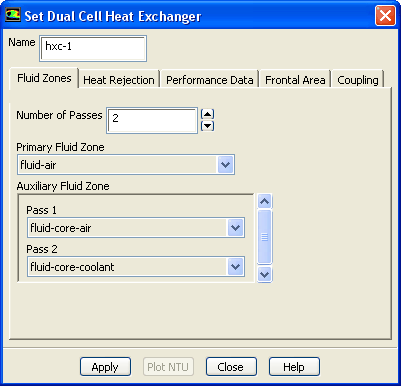
The
Set Dual Cell Heat Exchanger dialog box allows you to define the heat exchanger parameters. See Section
14.5 for details about using this dialog box.
Controls
Name
allows you to specify a name for the dual cell heat exchanger.
Fluid Zones
allows you to specify the fluid zone parameters for the heat exchanger.
Number of Passes
specifies the number of passes for the heat exchanger.
Primary Fluid Zone
allows you to specify the fluid of the primary fluid zone for the heat exchanger.
Auxiliary Fluid Zone
allows you to specify the fluid for the auxiliary fluid zone, per pass.
The selected zones must be overlapping in physical space.
Heat Rejection
contains parameters specific to the rejection of heat in the heat exchanger.
Options
allows you to specify how the heat rejection in the heat exchanger is computed.
Fixed Heat Rejection
allows you to specify heat rejection parameters.
Fixed Inlet Temperature
allows you use total heat rejection as the desired output.
Heat Rejection Targeted
allows you to specify the heat rejection desired from the heat exchanger (available only when the
Fixed Heat Rejection option is enabled).
Inlet Zone for Temperature Updates
allows
ANSYS FLUENT to change the temperature of the specified inlet zone in order to match the targeted heat rejection (available only when the
Fixed Heat Rejection option is enabled).
Temperature Update Under-Relaxation
controls convergence (available only when the
Fixed Heat Rejection option is enabled).
Iteration Interval Between Temperature Updates
controls divergence (available only when the
Fixed Heat Rejection option is enabled).
Performance Data
contains parameters for specifying the heat exchanger's performance data.
Options
allows you to choose between using raw performance data or NTU performace data.
Raw Data
allows you to specify raw performance data for the heat exchanger.
NTU Data
allows you to specify NTU performance data for the heat exchanger.
Heat Exchanger Performance Data
contains parameters concerning the heat exchanger's performance data.
NTU Table
opens the
NTU Table dialog box (available only when the
NTU Data option is enabled).
Heat Transfer Table
opens the
Heat Transfer Data Table dialog box (see Section
3e) (available only when the
Raw Data option is enabled).
Effectiveness-NTU Relation
computes the NTU values from the heat transfer data. Choose
cross-flow-unmixed,
parallel-flow, or
counter-flow, all of which are described in
this section (available only when the
Raw Data option is enabled).
Reference Inlet Temperature
allows you to specify the inlet reference temperature for the primary and the auxiliary fluids. (available only when the
Raw Data option is enabled).
Frontal Area
allows you to specify the frontal area for the heat exchanger.
Primary Fluid
allows you to specify a value for the
Core Frontal Area for the primary fluid, or to compute the value from a surface zone using the
Compute From drop-down list.
Auxiliary Fluid
allows you to specify a value for the
Core Frontal Area for the auxiliary fluid, or to compute the value from a surface zone using the
Compute From drop-down list.
Coupling
specifies parameters when you want to couple the heat exchanger passes.
Temperature
specifies, by default, the mass-weighted average for the temperature of the outlet of Pass 1 to the inlet of Pass 2. Similarly, the mass-weighted-average temperature of the outlet of Pass 2 will be applied at the inlet zone of Pass 3, and so on. (available only when multiple passes are specified in the
Fluid Zones tab).
Plot NTU
plots the performance data curve for the selected heat exchanger. The performance data is supplied through the
Performance Data tab.
![[ANSYS, Inc. Logo]](fluentlogo.gif)