[ANSYS, Inc. Logo] return to home search
next up previous contents index

34.7.13 Display/Import Particle Data...

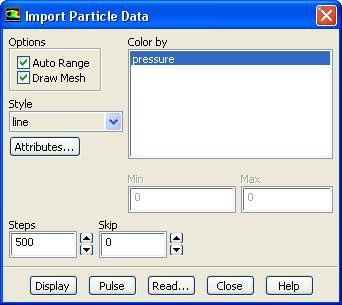
The Display/Import Particle Data... menu item opens the Import Particle Data dialog box.


Import Particle Data Dialog Box


The Import Particle Data dialog box allows you to import particle history data for display purposes. See Section  23.7.1 for details.

figure

Controls

Options   contains the check buttons that set various import particle data options.

Auto Range   toggles between automatic and manual setting of the particle data range.

Draw Mesh   toggles between displaying and not displaying the mesh. The Mesh Display dialog box is opened when Draw Mesh is selected.

Style   allows you to select pathline style.

Attributes...   opens Path Style Attributes dialog box. This allows you to modify the line width, cylinder radius or marker size.

Color by   contains a list from which you can select the scalar field to be used to color the particle data.

Min,Max   allows you to set the range when Auto Range is disabled.

Steps   sets the maximum number of steps a particle can advance.

Skip   allows you to "thin out'' the pathlines.

Display   displays pathlines.

Pulse   animates the particle positions. The Pulse button will become the Stop ! button during the animation, and you must click Stop ! to stop the pulsing.

Read...   opens a file selection dialog box where you can enter a file name and a directory for the imported data.


next up previous contents index Previous: 34.7.12 Display/DTRM Graphics...
Up: 34.7 Display Menu
Next: 34.7.14 Display/PDF Tables/Curves...
Release 12.0 © ANSYS, Inc. 2009-01-29