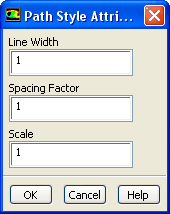
To modify the line width, cylinder radius or marker size, use the
Path Style Attributes dialog box. You can open this dialog box by clicking the
Attributes... button in the
Pathlines dialog box. See Section
29.1.4 for details about the items below.
Controls
Line Width/Marker Size/Width/
determines the thickness of the pathlines.
Diameter
specifies the diameter of the sphere. This parameter appears only when
sphere is selected under
Style in the
Pathlines dialog box.
Spacing Factor
controls the spacing of arrows when you use the
line-arrows style.
Scale
controls the size of the arrowheads when you use the
line-arrows style.
Detail
specifies the detail applied to the graphical rendering of the spheres. This parameter appears only when
sphere is selected under
Style in the
Pathlines dialog box.
![[ANSYS, Inc. Logo]](fluentlogo.gif)