The
Adapt/Yplus/Ystar... menu item opens the
Yplus/Ystar Adaption dialog box.
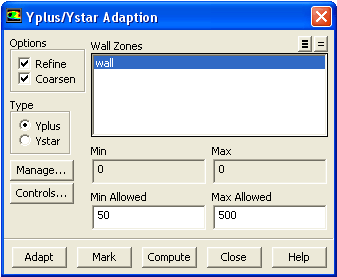
Yplus/Ystar Adaption Dialog Box
The
Yplus/Ystar Adaption dialog box allows you to mark or adapt boundary cells on specified wall zones based on the non-dimensional
or
parameter. See Section
27.8 for details.
Controls
Options
contains the check buttons that toggle the ability to mark and/or adapt cells for refinement or coarsening.
Refine
toggles the ability to refine cells or mark cells for refinement.
Coarsen
toggles the ability to coarsen cells or mark cells for coarsening.
Type
contains the check buttons that enable adaption based on
or
.
Yplus
enables
adaption.
Ystar
enables
adaption.
Wall Zones
contains a selectable list of active wall zones. Boundary cells associated with the wall zones you select will be marked or adapted based on the options, thresholds, and limitations applied in the dialog box.
Min/Max
displays the minimum and maximum cell values of
or
for all cells associated with viscous wall zones. Note that these values are independent of the wall zones selected. The real number field values are not editable; they are purely informational.
Min Allowed
designates the threshold value for coarsening the mesh. Cells with
or
values below the minimum threshold will be marked for coarsening.
Max Allowed
designates the threshold value for refining the mesh. Cells with
or
values above the maximum threshold will be marked for refinement.
Manage...
opens the
Manage Adaption Registers dialog box, which allows you to display and manipulate adaption registers that are generated using the
Mark command.
Adapt
adapts the mesh based the coarsening and refining toggle buttons, the wall zones selected, the minimum and maximum
or
allowed, and the adaption limits.
Mark
marks cells to be refined and/or coarsened based on the wall zones selected and the minimum and maximum
or
allowed in the mesh. This command produces an adaption register. For information on using adaption registers, see Section
27.11.1.
Compute
computes the minimum and maximum values of
or
on all cells on viscous walls and displays them in the
Min and
Max real number fields. Note that these are the extremes for the
or
values of every cell on a viscous wall, not just the cells associated with the selected zones.
![[ANSYS, Inc. Logo]](fluentlogo.gif)


 or
or
 parameter. See Section
27.8 for details.
parameter. See Section
27.8 for details.
 or
or
 .
.
 adaption.
 adaption.
  or
or
 for all cells associated with viscous wall zones. Note that these values are independent of the wall zones selected. The real number field values are not editable; they are purely informational.
 or
or
 values below the minimum threshold will be marked for coarsening.
 or
or
 values above the maximum threshold will be marked for refinement.
 or
or
 allowed, and the adaption limits.
 or
or
 allowed in the mesh. This command produces an adaption register. For information on using adaption registers, see Section
27.11.1.
allowed in the mesh. This command produces an adaption register. For information on using adaption registers, see Section
27.11.1.
 or
or
 on all cells on viscous walls and displays them in the
Min and
Max real number fields. Note that these are the extremes for the
on all cells on viscous walls and displays them in the
Min and
Max real number fields. Note that these are the extremes for the
 or
or
 values of every cell on a viscous wall, not just the cells associated with the selected zones.