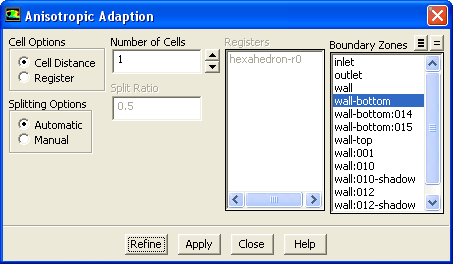
The
Adapt/Anisotropic... menu item opens the
Anisotropic Adaption dialog box.
Anisotropic Adaption Dialog Box
The
Anisotropic Adaption dialog box allows you to perform anisotropic adaption for certain cell types. See Section
27.9 for details..
Controls
-
Cell Options
controls the marking of boundary layer cells.
-
Cell Distance
indicates adaption using the distance of the marked cell to the boundary zone.
-
Register
indicates adaption using an existing register.
-
Splitting Options
control how the splitting ratio is computed.
-
Automatic
allows the ratio to be computed automatically from the mesh.
-
Manual
allows you to enter a specific value for the ratio in the
Split Ratio field.
-
Number of Cells
indicates the number of cells to be adapted and marked (available only when the
Cell Distance option is enabled).
-
Split Ratio
allows you to specify a value for the split ratio (available only when the
Manual splitting option is enabled).
-
Registers
provides a list of existing registers (available only when the
Register option is enabled).
-
Boundary Zones
contains a list of available boundary zones.
-
Refine
refines the marked cells.


 Previous:
34.5.6 Adapt/Yplus/Ystar...
Previous:
34.5.6 Adapt/Yplus/Ystar...
Up:
34.5 Adapt Menu
Next:
34.5.8 Adapt/Manage...
Release 12.0 © ANSYS, Inc. 2009-01-29 ![[ANSYS, Inc. Logo]](fluentlogo.gif)