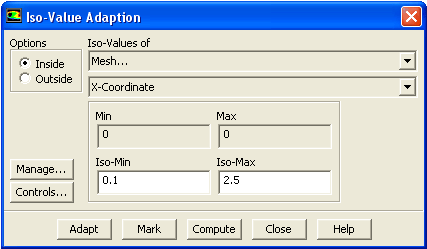
The
Adapt/Iso-Value... menu item opens the
Iso-Value Adaption dialog box.
Iso-Value Adaption Dialog Box
The
Iso-Value Adaption dialog box allows you to mark or refine cells inside or outside a specified range of a selected scalar function. See Section
27.5 for details.
Controls
Options
contains radio buttons that control whether the cells inside or outside the isovalue range are marked for refinement.
Inside
enables the marking of cells with values between
Iso-Min and
Iso-Max.
Outside
enables the marking of cells with values less than
Iso-Min or greater than
Iso-Max.
Iso-Values of
contains a list from which you can select the solution variable to be used in the isovalue adaption function.
Min/Max
displays the minimum and maximum cell values of the selected field variable. The real number field values are not editable; they are purely informational.
Iso-Min
defines the minimum isovalue threshold.
Iso-Max
defines the maximum isovalue threshold.
Manage...
opens the
Manage Adaption Registers dialog box, which allows you to display and manipulate adaption registers that are generated using the
Mark command.
Adapt
adapts the mesh based on the isovalues of the selected solution variable, the isovalue ranges, and the
Inside/Outside option.
Mark
marks cells to be refined based on the isovalues of the selected quantity, the isovalue ranges, and the
Inside/Outside option. This command produces an adaption register. For information on using adaption registers, see Section
27.11.1.
Compute
computes the minimum and maximum cell values of the selected solution variable and displays them in the
Min and
Max real number fields.
![[ANSYS, Inc. Logo]](fluentlogo.gif)