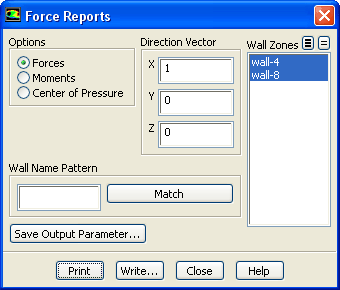
The
Force Reports dialog box allows you to compute the forces along a specified vector, moments about a specified center, and the coordinates of the center of pressure for selected wall zones. See Section
30.4 for details.
Controls
Options
contains radio buttons that control computation of the forces, moments, or center of pressure.
Forces
enables the computation of the pressure and viscous forces.
Moments
enables the computation of the pressure and viscous moments.
Center of Presure
enables the computation of the average location of the pressure.
Direction Vector
contains the components of the force vector. This label is visible when the
Forces radio button is active.
X,Y,Z
are the components of the force vector along which the forces will be computed.
Moment Center
contains the Cartesian coordinates of the moment center. This label is visible when the
Moments radio button is active.
X,Y,Z
are the Cartesian coordinates of the moment center about which moments will be computed.
Moment Axis
contains the Cartesian coordinates of the moment axis. This label is visible when the
Moments radio button is active.
X,Y,Z
are the Cartesian coordinates of the moment axis about which moments will be computed.
Coordinate
contains the value of the Cartesian coordinate that is fixed. This label is visible when the
Center of Pressure radio button is active.
X,Y,Z
are the Cartesian coordinates, one of which will be fixed.
Value (n)
is the point where the selected Cartesian coordinate will be fixed.
Wall Zones
contains a selectable list of wall zones. The force or moment information is printed for each zone, and then a total force or moment for all the zones is presented.
Wall Name Pattern
specifies the pattern to look for in the names of wall zones. Type the pattern in the text field and click
Match to select (or deselect) the zones in the
Wall Zones list with names that match the specified pattern. See Section
30.4.1 for information about matching additional characters using
* and
?.
Print
displays(in the console) the pressure, viscous (if appropriate), and total forces or moments, and the pressure, viscous, and total force coefficients along the specified force vector or moment center for the selected wall zones. The center of pressure coordinates will print to the console when the
Center of Pressure option is activated.
Write...
opens the
Select File dialog box (see Section
2.1.6), which you can use to save the reported values to a file.
![[ANSYS, Inc. Logo]](fluentlogo.gif)