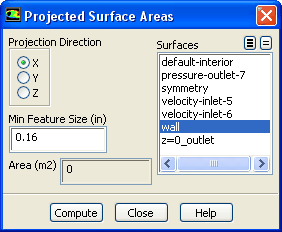
The
Projected Surface Areas dialog box allows you to compute an estimated area of the projection of selected surfaces along the
,
, or
axis. See Section
30.5 for details.
Controls
Projection Direction
indicates the direction along which to project the surface.
Min Feature Size
specifies the length of the smallest feature in the geometry that you want to resolve in the area calculation.
Area
displays the computed projected area.
Surfaces
contains a list of existing surfaces. You can select the surface(s) for which the projected area is to be calculated in this list.
Compute
computes the area of the selected surfaces projected along the selected direction. The area will be printed in the
Area box and in the console window.
![[ANSYS, Inc. Logo]](fluentlogo.gif)


 ,
,
 , or
, or
 axis. See Section
30.5 for details.
axis. See Section
30.5 for details.