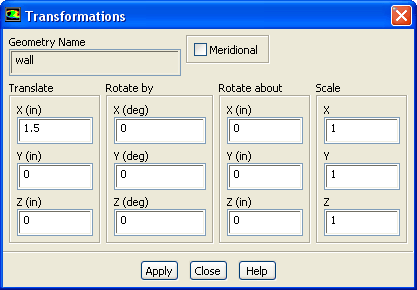
You can use the
Transformations dialog box to translate, rotate, or scale individual objects in the graphics display. To open this dialog box, click the
Transform... push button in the
Scene Description dialog box. See Section
29.6.3 for details about the items below.
Controls
Geometry Name
displays the name of the object you selected for modification in the
Scene Description dialog box.
Meridional
(3D only) enables the display of the meridional view. This option is especially useful in turbomachinery applications.
Translate
contains
X,
Y, and
Z real number fields in which you can enter the distance by which to translate the selected object in each direction.
Rotate by
contains
X,
Y, and
Z integer number fields in which you can enter the number of degrees by which to rotate the selected object about each axis.
Rotate about
specifies the point about which to rotate the object.
Scale
contains
X,
Y, and
Z real number fields in which you can enter the amount by which to scale the selected object in each direction. To avoid distortion of the object's shape, be sure to specify the same value for all three entries.
![[ANSYS, Inc. Logo]](fluentlogo.gif)