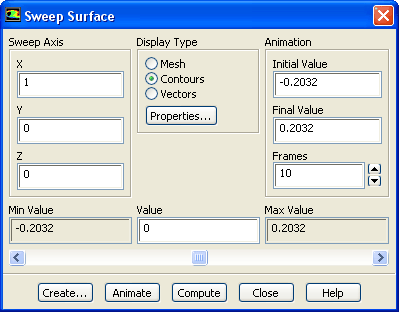
The
Sweep Surface dialog box controls the display and animation of mesh, contour, and vector plots generated on a sweep surface. See Section
29.1.5 for details about the items below.
Controls
Sweep Axis
specifies the (
X,
Y,
Z) vector representing the axis along which the surface should be swept.
Display Type
specifies the type of display to be swept through the domain (
Mesh,
Contours, or
Vectors).
Properties...
opens the
Contours dialog box if
Contours is the selected
Display Type, or the
Vectors dialog box if
Vectors is the selected
Display Type. (This button is not available if
Mesh is the selected
Display Type.)
Animation
contains controls for animating the sweep-surface display.
Initial Value, Final Value
specify the initial and final positions for the animation.
Frames
specifies the number of frames in the animation.
Min Value, Max Value
show the minimum and maximum extents of the domain along the specified
Sweep Axis. These values are updated when you click
Compute.
Value
shows the current position at which the requested display is plotted. You can change the value by moving the slide bar below it, or by entering a new value and pressing the
<RETURN> key.
Create...
opens the
Create Surface dialog box, where you can create a surface from the currently-displayed sweep surface.
Animate
animates the display, sweeping the requested display through the domain along the specified axis.
Compute
updates the
Min Value and
Max Value to reflect the minimum and maximum extents of the domain along the specified
Sweep Axis.
![[ANSYS, Inc. Logo]](fluentlogo.gif)