![[ANSYS, Inc. Logo]](fluentlogo.gif)


|
|
|
The Soot Model dialog box allows you to set parameters related to the soot model. See Section 21.3.1 for details about the items below.
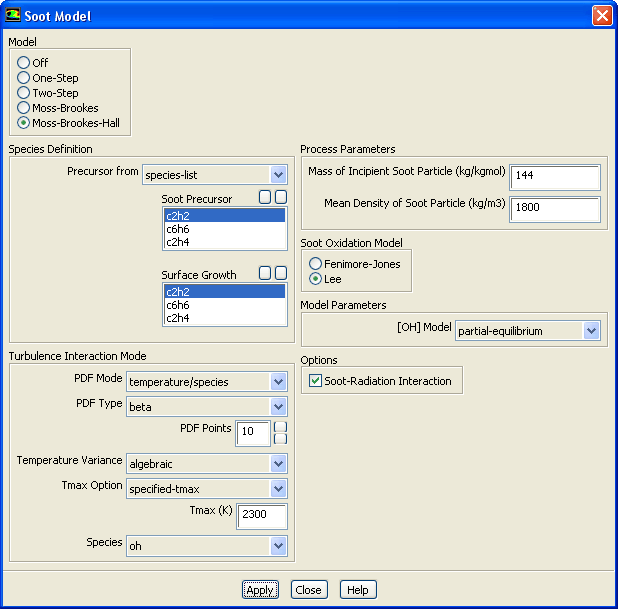
Controls
 H
H
 , C
, C
 H
H
 , C
, C
 H
H
 , and H
 are present in the gas phase species list.
the chemical species for your model.
 ), which is used for the integration of the temperature PDF. This option is only available if you have already compiled a UDF.
 in
this equation in the separate
Theory Guide for the
Two-Step model.
in
this equation in the separate
Theory Guide for the
Two-Step model.
 in
this equation in the separate
Theory Guide. For the
Moss-Brookes and
Moss-Brookes-Hall models, it is
in
this equation in the separate
Theory Guide. For the
Moss-Brookes and
Moss-Brookes-Hall models, it is
 in
this equation and
in
this equation and
 in
this equation in the separate
Theory Guide. The default value supplied by
ANSYS FLUENT is 1800 kg/m
in
this equation in the separate
Theory Guide. The default value supplied by
ANSYS FLUENT is 1800 kg/m
 (as was used in the work of Brookes and Moss [
12]).
(as was used in the work of Brookes and Moss [
12]).
 in
this equation in the separate
Theory Guide , which computes the soot combustion rate in the
One-Step and
Two-Step models. The default value supplied by
ANSYS FLUENT (2.6667) assumes that the soot is pure carbon and that the oxidizer is O
in
this equation in the separate
Theory Guide , which computes the soot combustion rate in the
One-Step and
Two-Step models. The default value supplied by
ANSYS FLUENT (2.6667) assumes that the soot is pure carbon and that the oxidizer is O
 .
.
 in
this equation in the separate
Theory Guide , which computes the soot combustion rate in the
One-Step and
Two-Step models. The default value supplied by
ANSYS FLUENT (3.6363) is for combustion of propane (C
in
this equation in the separate
Theory Guide , which computes the soot combustion rate in the
One-Step and
Two-Step models. The default value supplied by
ANSYS FLUENT (3.6363) is for combustion of propane (C
 H
H
 ) by oxygen (O
 ).
).
 in
this equation and
this equation , which is used in the
Moss-Brookes and
Moss-Brookes-Hall model computations. The default value supplied by
ANSYS FLUENT (144 kg/mol) is the mass of 12 carbon atoms. Note that for the original implementation of the Hall extension, the model assumed this mass to be 100 carbon atoms.
in
this equation and
this equation , which is used in the
Moss-Brookes and
Moss-Brookes-Hall model computations. The default value supplied by
ANSYS FLUENT (144 kg/mol) is the mass of 12 carbon atoms. Note that for the original implementation of the Hall extension, the model assumed this mass to be 100 carbon atoms.
 in
this equation in the separate
Theory Guide. This item appears only for the
One-Step soot model.
in
this equation in the separate
Theory Guide. This item appears only for the
One-Step soot model.
 in
this equation in the separate
Theory Guide. This item appears only for the
One-Step soot model.
in
this equation in the separate
Theory Guide. This item appears only for the
One-Step soot model.
 in
this equation in the separate
Theory Guide.
this equation will be solved only if
Equivalence Ratio Minimum
in
this equation in the separate
Theory Guide.
this equation will be solved only if
Equivalence Ratio Minimum
 Equivalence Ratio Maximum; if
 is outside of this range, there is no soot formation. This item appears only for the
One-Step soot model.
is outside of this range, there is no soot formation. This item appears only for the
One-Step soot model.
 in
this equation in the separate
Theory Guide. This item appears only for the
One-Step soot model.
in
this equation in the separate
Theory Guide. This item appears only for the
One-Step soot model.
 used in the rate expressions governing the soot combustion rate (
this equation and
this equation ) in the separate
Theory Guide. This item appears only for the
One-Step and the
Two-Step soot models. For the
Two-Step model, this input will be called
Magnussen Constant for Soot and Nuclei Combustion.
used in the rate expressions governing the soot combustion rate (
this equation and
this equation ) in the separate
Theory Guide. This item appears only for the
One-Step and the
Two-Step soot models. For the
Two-Step model, this input will be called
Magnussen Constant for Soot and Nuclei Combustion.
 in
this equation in the separate
Theory Guide. Below this limiting value, the branching and termination term, (
in
this equation in the separate
Theory Guide. Below this limiting value, the branching and termination term, (
 ) in
this equation in the separate
Theory Guide , is not included. This item appears only for the
Two-Step soot model.
) in
this equation in the separate
Theory Guide , is not included. This item appears only for the
Two-Step soot model.
 in
this equation in the separate
Theory Guide. This item appears only for the
Two-Step soot model.
in
this equation in the separate
Theory Guide. This item appears only for the
Two-Step soot model.
 in
this equation in the separate
Theory Guide. This item appears only for the
Two-Step soot model.
in
this equation in the separate
Theory Guide. This item appears only for the
Two-Step soot model.
 in the kinetic nuclei formation term,
this equation in the separate
Theory Guide. This item appears only for the
Two-Step soot model.
in the kinetic nuclei formation term,
this equation in the separate
Theory Guide. This item appears only for the
Two-Step soot model.
 in the kinetic nuclei formation term,
this equation in the separate
Theory Guide. This item appears only for the
Two-Step soot model.
in the kinetic nuclei formation term,
this equation in the separate
Theory Guide. This item appears only for the
Two-Step soot model.
 , the constant in the soot formation rate equation,
this equation in the separate
Theory Guide. This item appears only for the
Two-Step soot model.
, the constant in the soot formation rate equation,
this equation in the separate
Theory Guide. This item appears only for the
Two-Step soot model.
 , the constant in the soot formation rate equation,
this equation in the separate
Theory Guide. This item appears only for the
Two-Step soot model.
, the constant in the soot formation rate equation,
this equation in the separate
Theory Guide. This item appears only for the
Two-Step soot model.
 used in the rate expressions governing the soot combustion rate (
this equation and
this equation in the separate
Theory Guide). This item appears only for the
One-Step and the
Two-Step soot models.
used in the rate expressions governing the soot combustion rate (
this equation and
this equation in the separate
Theory Guide). This item appears only for the
One-Step and the
Two-Step soot models.
|
|
To use the concentration of OH or O predicted by the combustion model, select
instantaneous for
[OH] Model or
[O] Model.
|
Previous:
33.3.27 SOx Model Dialog
