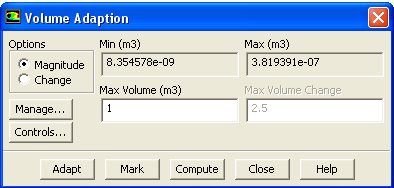
The procedure for performing volume adaption is as follows:
1.
In the
Volume Adaption dialog box, specify whether you want to adapt based on volume magnitude or volume change by selecting the
Magnitude or
Change option.
2.
Click on
Compute to update the
Min and
Max fields. These fields will show the range of cell volumes or cell volume changes (defined in
this section in the separate
Theory Guide), depending on your selection in step 1.
3.
Set the
Max Volume or
Max Volume Change value.
(a)
If you have chosen to adapt based on volume
Magnitude, cells that have volumes greater than
Max Volume will be marked or refined.
(b)
If you are adapting based on volume
Change, cells with volume changes greater than
Max Volume Change will be marked or refined.
4.
(optional) If you want to set any adaption options (described in Section
27.12), click on the
Controls... button to open the
Mesh Adaption Controls dialog box.
5.
Click
Mark to mark the cells for refinement by placing them in an adaption register (which can be manipulated as described in Section
27.11.1), or click
Adapt to perform the refinement immediately.
![[ANSYS, Inc. Logo]](fluentlogo.gif)


 Volume...