![[ANSYS, Inc. Logo]](fluentlogo.gif)


|
|
|
The next step in the non-premixed combustion modeling process in ANSYS FLUENT is the solution of the mixture fraction and flow equations. First, initialize the flow. By default, the mixture fraction and its variance have initial values of zero, which is the recommended value; you should generally not set non-zero initial values for these variables. See Section 26.9 for details about solution initialization.
 Solution Initialization
Next, begin calculations in the usual manner.
 Run Calculation
During the calculation process, ANSYS FLUENT reports residuals for the mixture fraction and its variance in the fmean and fvar columns of the residual report:
iter cont x-vel y-vel k epsilon fmean fvar 28 1.57e-3 4.92e-4 4.80e-4 2.68e-2 2.59e-3 9.09e-1 1.17e+0 29 1.42e-3 4.43e-4 4.23e-4 2.48e-2 2.30e-3 8.89e-1 1.15e+0 30 1.28e-3 3.98e-4 3.75e-4 2.29e-2 2.04e-3 8.88e-1 1.14e+0 |
(For two-mixture-fraction calculations, columns for psec and pvar will also appear.)
Under-Relaxation Factors for PDF Equations
The transport equations for the mean mixture fraction and mixture fraction variance are quite stable and high, under-relaxation can be used when solving them. By default, an under-relaxation factor of 1 is used for the mean mixture fraction (and secondary partial fraction) and 0.9 for the mixture fraction variance (and secondary partial fraction variance). If the residuals for these equations are increasing, you should consider decreasing these under-relaxation factors, as discussed in Section 26.3.2.
Density Under-Relaxation
One of the main reasons a combustion calculation can have difficulty converging is that large changes in temperature cause large changes in density, which can, in turn, cause instabilities in the flow solution. ANSYS FLUENT allows you to under-relax the change in density to alleviate this difficulty. The default value for density under-relaxation is 1, but if you encounter convergence trouble you may wish to reduce this to a value between 0.5 and 1 (in the Solution Controls task page).
Tuning the PDF Parameters for Two-Mixture-Fraction Calculations
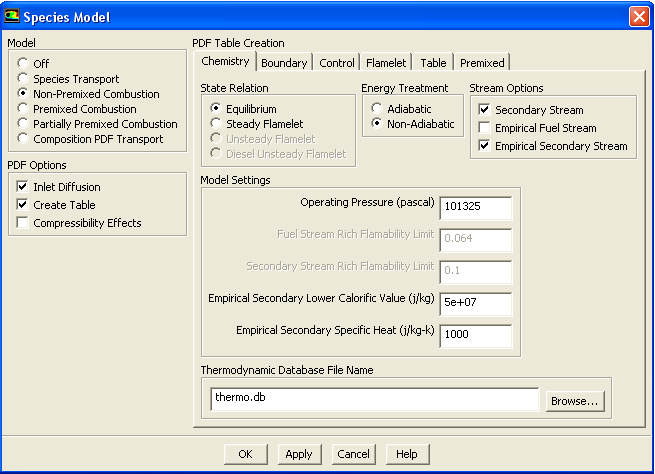
For cases that include a secondary stream, the PDF integrations are performed inside ANSYS FLUENT.
The parameters for these integrations are defined in the Species Model dialog box (Figure 16.10.1).
 Models

 Species
 Edit...
The parameters are as follows:
For simulations involving non-adiabatic multiple strained flamelets, looking up the four-dimensional PDF tables can be CPU-intensive. In such cases, the Number of Flow Iterations Per Property Update controls the updating of flow properties such as density.
For the Eulerian unsteady laminar flamelet model, a marker probability equation is solved in an unsteady mode. Residuals for ufla-prob will be displayed.
Previous:
16.10.3 Starting a Non-Premixed