![[ANSYS, Inc. Logo]](fluentlogo.gif)


|
|
|
It is important for you to view your temperature and species tables to ensure that they are adequately but not excessively resolved. Inadequate resolution will lead to inaccuracies, and excessive resolution will lead to unnecessarily slow calculation times.
After a PDF table has been generated or read into ANSYS FLUENT, you can display 2D plots and 3D surfaces showing the variation of species mole fraction, density, or temperature with the mean mixture fraction, mixture fraction variance, or enthalpy using the PDF Table dialog box (e.g., Figure 16.7.2). The PDF Table dialog box can be accessed in one of two ways: you can click on the Display PDF Table... button in the Table tab of the Species Model dialog box (as shown in Figure 16.7.1) or you can use the path
Display
 PDF Tables/Curves...
To display the look-up tables graphically, use the following procedure:
 ),
Mean Mixture Fraction (
),
Mean Mixture Fraction (
 ), or
Scaled Variance (
), or
Scaled Variance (
 ). For any mean mixture fraction
 , the variance varies between a minimum of 0 and a maximum of
 . In order to view the mixture fraction variance, it is normalized by Equation
16.7-1 so that for any mean mixture fraction the scaled variance ranges from 0 to 0.25.
. In order to view the mixture fraction variance, it is normalized by Equation
16.7-1 so that for any mean mixture fraction the scaled variance ranges from 0 to 0.25.
 ), or
Scaled Variance (
), or
Scaled Variance (
 ).
).
 ),
Mean Mixture Fraction, and
Scaled Variance.
),
Mean Mixture Fraction, and
Scaled Variance.
 ) or
Secondary Partial Fraction (
) or
Secondary Partial Fraction (
 ).
).
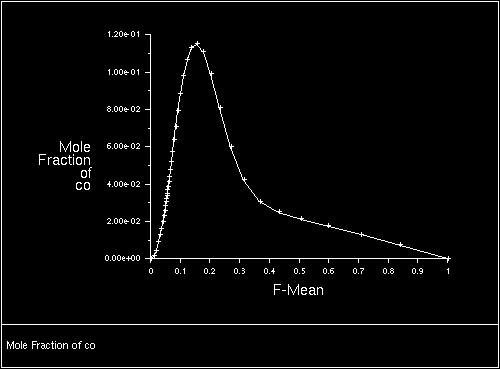
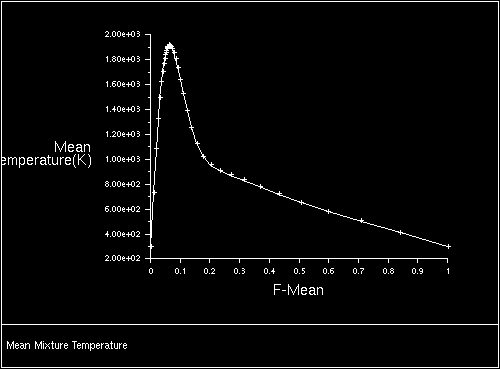
Figures 16.7.3 and 16.7.4 shows examples of 2D plots derived for a very simple hydrocarbon system.
Figure 16.7.5 shows an example of a 3D surface derived for the same system.
Files for Flamelet Modeling
In this section, information is provided about the standard flamelet files used for flamelet generation and import.
Standard Flamelet Files
The data structure for the standard flamelet file format is based on keywords that precede each data section. If any of the keywords in your flamelet data file do not match the supported keywords, you will have to manually edit the file and change the keywords to one of the supported types. (The ANSYS FLUENT flamelet filter is case-insensitive, so you need not worry about capitalization within the keywords.)
The following keywords are supported by the ANSYS FLUENT filter:
Sample File
A sample flamelet file in the standard format is provided below. Note that not all species are listed in this file.
HEADER
STRAINRATE 100.
NUMOFSPECIES 12
GRIDPOINTS 39
PRESSURE 1.
BODY
Z
  0.0000E+00  4.3000E-07  2.1780E-06  1.2651E-05  7.8456E-05
  2.1876E-04  5.9030E-04  9.4701E-04  1.4700E-03  1.8061E-03
  2.1967E-03  2.6424E-03  3.1435E-03  4.3038E-03  5.6637E-03
  8.9401E-03  1.2800E-02  1.7114E-02  2.1698E-02  2.6304E-02
  2.8522E-02  3.0647E-02  3.2680E-02  3.4655E-02  4.2784E-02
  5.2655E-02  6.5420E-02  8.2531E-02  1.0637E-01  1.4122E-01
  1.9518E-01  2.8473E-01  4.4175E-01  6.6643E-01  8.6222E-01
  9.5897E-01  9.9025E-01  9.9819E-01  1.0000E+00
TEMPERATURE
  3.0000E+02  3.0013E+02  3.0085E+02  3.0475E+02  3.2382E+02
  3.5644E+02  4.3055E+02  4.9469E+02  5.8260E+02  6.3634E+02
  6.9655E+02  7.6268E+02  8.3393E+02  9.8775E+02  1.1493E+03
  1.4702E+03  1.7516E+03  1.9767E+03  2.1403E+03  2.2444E+03
  2.2766E+03  2.2962E+03  2.3044E+03  2.3027E+03  2.2164E+03
  2.0671E+03  1.8792E+03  1.6655E+03  1.4355E+03  1.1986E+03
  9.6530E+02  7.5025E+02  5.7496E+02  4.4805E+02  3.6847E+02
  3.2730E+02  3.0939E+02  3.0248E+02  3.0000E+02
MASSFRACTION-H2
  3.2354E-07  7.4290E-07  1.6979E-06  3.8179E-06  8.3038E-06
  1.2219E-05  1.7873E-05  2.1556E-05  2.5872E-05  2.8290E-05
  3.0888E-05  3.3684E-05  3.6720E-05  4.3768E-05  5.4359E-05
  1.0484E-04  2.6807E-04  6.1906E-04  1.2615E-03  2.3555E-03
  3.1422E-03  4.1281E-03  5.3302E-03  6.7434E-03  1.4244E-02
  2.4296E-02  3.7472E-02  5.5159E-02  7.9788E-02  1.1573E-01
  1.7135E-01  2.6359E-01  4.2527E-01  6.5658E-01  8.5814E-01
  9.5775E-01  9.8996E-01  9.9814E-01  1.0000E+00
MASSFRACTION-CH4
     .          .            .           .           .
     .          .            .           .           .
     .          .            .           .           .
MASSFRACTION-O
  6.8919E-10  2.8720E-09  1.1905E-08  4.8669E-08  2.0370E-07
  5.5281E-07  1.7418E-06  3.6996E-06  8.3107E-06  1.3525E-05
  2.2484E-05  3.8312E-05  6.6385E-05  1.8269E-04  4.4320E-04
  1.4284E-03  2.7564E-03  3.9063E-03  4.3237E-03  3.7141E-03
  3.0916E-03  2.3917E-03  1.7345E-03  1.2016E-03  2.4323E-04
  5.2235E-05  1.1469E-05  2.3011E-06  3.7414E-07  4.2445E-08
  2.7470E-09  8.7551E-11  2.9341E-12  7.0471E-13  0.0000E+00
  7.2143E-14  0.0000E+00  0.0000E+00  0.0000E+00
|
Missing Species
ANSYS FLUENT will check whether all species in the flamelet data file exist in the thermodynamic properties databases thermo.db. If any of the species in the flamelet file do not exist, ANSYS FLUENT will issue an error message and halt the flamelet import. If this occurs, you can either add the missing species to the database, or remove the species from the flamelet file.
You should not remove a species from the flamelet data file unless its species concentration is very small (
 or less) throughout the flamelet profile. If you remove a low-concentration species, you will not have the species concentrations available for viewing in the
ANSYS FLUENT calculation, but the accuracy of the
ANSYS FLUENT calculation will otherwise be unaffected.
or less) throughout the flamelet profile. If you remove a low-concentration species, you will not have the species concentrations available for viewing in the
ANSYS FLUENT calculation, but the accuracy of the
ANSYS FLUENT calculation will otherwise be unaffected.
|
|
If you choose to remove any species, be sure to also update the number of species (keyword
NUMOFSPECIES) in the flamelet data file, to reflect the loss of any species you have removed from the file.
|
If a species with relatively large concentration is missing from the ANSYS FLUENT thermodynamic databases, you will have to add it. Removing a high-concentration species from the flamelet file is not recommended.
Previous:
16.7.3 Saving the Look-Up