![[ANSYS, Inc. Logo]](fluentlogo.gif)


|
|
|
If you are generating a flamelet file yourself, you will need to read in the chemical kinetic mechanism and thermodynamic data. The mechanism and thermodynamic data must be in CHEMKIN format [ 39].
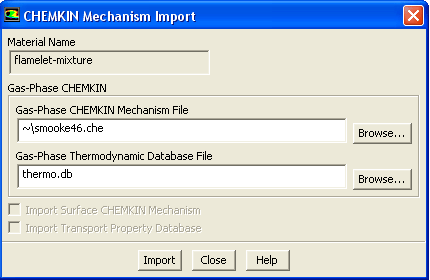
To read in a CHEMKIN mechanism, select the Create Flamelet option in the Chemistry tab of the Species Model dialog box and click the Import CHEMKIN Mechanism... button. When you click this button, the CHEMKIN Mechanism Import dialog box (Figure 16.3.2) will open. In the CHEMKIN Mechanism Import dialog box, enter the path to the CHEMKIN file to be read under Gas-Phase CHEMKIN Mechanism File and specify the location of the thermodynamic database under Gas-Phase Thermodynamic Database File. Alternatively, you can click the appropriate Browse... button to open a Select File dialog box (see Section 2.1.6), or simply use the default thermo.db which is already provided.
Click Import in the CHEMKIN Mechanism Import dialog box to read the specified files into ANSYS FLUENT. Note that the import is limited to mechanisms with 300 or fewer species and 1500 or fewer reactions.
Previous:
16.3.2 Specifying the Operating