![[ANSYS, Inc. Logo]](fluentlogo.gif)


|
|
|
For isotropic diffusion,
 in Equation
8.6-1 is equal to a scalar
in Equation
8.6-1 is equal to a scalar
 times the identity matrix and the equation reduces to
You can specify isotropic diffusivity as a single user-defined function that applies to all UDS transport equations. For this case, choose user-defined from the drop-down list for UDS Diffusivity in the Create/Edit Materials dialog box
 Materials
If you have previously loaded a compiled UDF library or have interpreted the UDF, then the User-Defined Functions dialog box will open, allowing you to hook the DEFINE_DIFFUSIVITY UDF to ANSYS FLUENT. If no functions have been loaded, you will get an error message. More information about user-defined functions can be found in the separate UDF Manual.
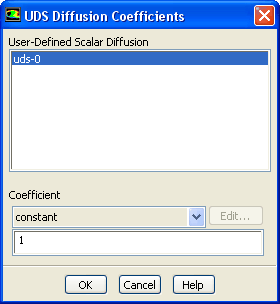
Isotropic diffusion coefficients can also be defined on a per-scalar basis by selecting defined-per-uds from the drop-down list for UDS Diffusivity in the Create/Edit Materials dialog box. This will open the UDS Diffusion Coefficients dialog box (Figure 8.6.1).
In the
UDS Diffusion Coefficients dialog box, select a scalar equation (e.g.,
uds-0) and then choose a
constant,
polynomial, or
user-defined function from the
Coefficient drop-down list. (For the default fluid (air), the constant diffusion coefficient is
 kg/m-s.) If you choose
polynomial, the
Polynomial Profile dialog box will open and you can specify your coefficients as a function of temperature. See Section
8.2.1 for details.
kg/m-s.) If you choose
polynomial, the
Polynomial Profile dialog box will open and you can specify your coefficients as a function of temperature. See Section
8.2.1 for details.
When you select the user-defined option, the User-Defined Functions dialog box will open allowing you to hook a DEFINE_DIFFUSIVITY UDF only if you have previously loaded a compiled UDF library or interpreted a UDF. Otherwise, you will get an error message. More information about user-defined functions can be found in the separate UDF Manual.
Previous:
8.6 User-Defined Scalar (UDS)