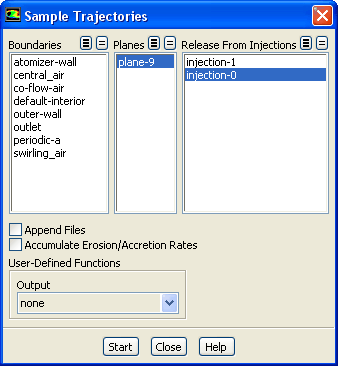
The
Sample Trajectories dialog box allows the writing of particle states (position, velocity, diameter, temperature, and mass flow rate) at various boundaries and planes (lines in 2D). See Section
23.7.6 for details about the items below.
Controls
Boundaries
lists boundaries that can be chosen as the surfaces at which samples will be written.
Lines
(in 2D) lists lines that can be chosen as the surfaces at which samples will be written.
Planes
(in 3D) lists planes that can be chosen as the surfaces at which samples will be written.
Release From Injections
lists injections from which the injection to be tracked is chosen.
Append Files
causes the results of multiple calculations to be appended to a single file.
Accumulate Erosion/Accretion Rates
causes erosion and accretion rates to be accumulated for repeated trajectory calculations.
User-Defined Functions
allow control of the format and the information written for the sample output.
Output
contains a drop-down list of available user-defined functions.
Compute
causes the particles to be tracked and their status to be written to files when they encounter selected surfaces. This button will not appear for unsteady particle tracking.
Start
initiates sampling for unsteady particle tracking. This button will replace the
Compute button if you are performing unsteady particle tracking. After you click it, it will change to the
Stop button. Click
Stop to stop the sampling. (The label will change back to
Start.)
![[ANSYS, Inc. Logo]](fluentlogo.gif)