The
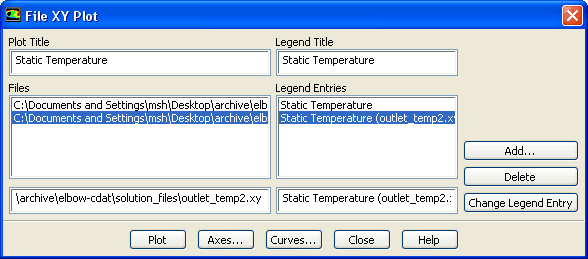
File XY Plot dialog box allows you to display data read from one or more files in an abscissa/ordinate plot form. The format of the plot file is described in Section
29.9.6. See Section
29.9.3 for details about the items below.
Controls
Plot Title
displays the current plot title. The default plot title is the
-axis label of the first file read into the dialog box, but you can edit the text entry to change the plot title.
Files
contains a selectable list of loaded file names. If you enter a valid file name into the text entry field below the list and press the
Add... button
ANSYS FLUENT will load the file and update the dialog box. If, however, the file is not found or has already been read, the
Select File dialog box (see Section
2.1.6) will be opened.
Legend Title
sets the title of the legend. By default, the legend has no title.
Legend Entries
contains a selectable list of legend labels associated with the loaded files. The default legend label is the title (first string) in the file. You can modify the legend label by selecting the old name in the
Legend Entries list. It is then displayed in the text entry field below the list and may be edited.
Add...
loads the file named in the
Files text entry field or opens the
Select File dialog box if no name, a wrong name, or a duplicate name appears in that text field.
Delete
removes the file selected in the
Files list.
Change Legend Entry
changes the legend label of the selected file to the text entered in the text entry field below the
Legend Entries list.
Plot
displays an XY plot of the data associated with every loaded file. You can use the
Delete button to remove files that you do not wish to plot.
Axes...
opens the
Axes dialog box, which allows you to customize the plot axes.
Curves...
opens the
Curves dialog box, which allows you to customize the curves used in the XY plot.
![[ANSYS, Inc. Logo]](fluentlogo.gif)


 -axis label of the first file read into the dialog box, but you can edit the text entry to change the plot title.