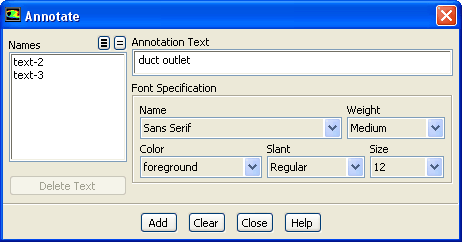
You can use the
Annotate dialog box to add text with optional attachment lines to the graphics windows, or to modify existing text. See Section
29.2.4 for details about the items below.
Controls
Names
contains a selectable list of all annotation text strings that have been defined. You can choose a text string to be deleted or edited.
Delete Text
deletes the text strings selected in the
Names list from the display.
Annotation Text
contains the annotation text string you wish to add, or the annotation text string for the item selected in the
Names list.
Font Specification
contains controls for defining or modifying the font in the annotation text string.
Name
contains a drop-down list of various font styles.
Weight
contains a drop-down list from which you can select
Medium or
Bold.
Color
contains a drop-down list of colors that can be used for the text.
Slant
contains a drop-down list from which you can select
Regular or
Italic as the slant type.
Size
contains a drop-down list of font sizes (in points).
Add
adds the current
Annotation Text to the active graphics window. A dialog box will prompt you to select a screen location using the mouse-probe button on your mouse (see Section
29.3 for more information on setting the mouse buttons).
Edit
updates the edited text in the active graphics window. This button will replace the
Add button when you are editing an existing text string from the
Names list.
Clear
removes all annotation text and attachment lines from the active graphics window.
![[ANSYS, Inc. Logo]](fluentlogo.gif)