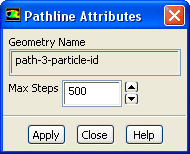
The
Pathline Attributes dialog box allows you to change the number of steps used in the computation of pathlines. This is most useful in creating animations of pathlines. To open this dialog box, click the
Pathlines... button in the
Scene Description dialog box. See Section
29.6.5 for details about using this dialog box.
Controls
Geometry Name
displays the name of the geometric object you selected for modification in the
Scene Description dialog box.
Max Steps
sets the new maximum number of steps for pathline computation. After you change the value and click on
Apply, the selected pathline will be recomputed and redrawn.
![[ANSYS, Inc. Logo]](fluentlogo.gif)