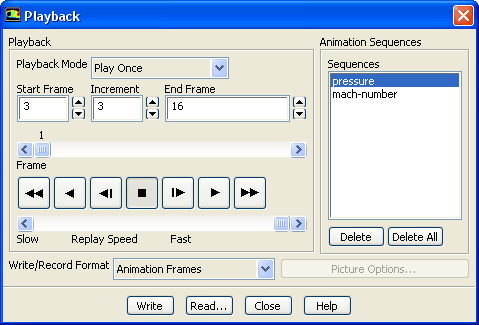
The
Playback dialog box allows you to play back an animation sequence.SeeSection
26.16.2 for details about the items below.
Controls
Playback
contains the controls that you use to play back the selected animation sequence.
Playback Mode
contains a drop-down list of playback options.
Play Once
sets the option to play back frames from
Start Frame to
End Frame once.
Auto Repeat
sets the option to continually play back frames from
Start Frame to
End Frame.
Auto Reverse
sets the option to continually play back the images while reversing playback direction after each set.
Start Frame, End Frame
set the frames at which the animation should begin and end. By changing these numbers you can view a subset of the frames.
Increment
sets the number of frames to increment the frame-counter by when you use the fast-forward or fast-reverse buttons.
Frame
shows the number of the frame that is currently displayed, as well as its relative position in the entire animation. If you slide the bar to a different location, the frame corresponding to the new frame number will be displayed in the graphics window.
(Tape Player Buttons)
allow you to play the animation forward and backward, fast-reverse and fast-forward the animation, and stop it. The buttons function in a way similar to those on a standard video cassette player.
Replay Speed
controls the playback speed for the animation. Move the
Replay Speed slider bar to the left to reduce the playback speed (and to the right to increase it).
Animation Sequences
contains the controls that you use to define the sequence to be played back.
Sequences
contains a list of the animation sequences that have been defined.
Delete
deletes the animation sequence that is selected in the
Sequences list.
Delete All
deletes all animation sequences in the
Sequences list.
Write/Record Format
specifies
Animation Frames,
Picture Files, or
MPEG as the format in which to save the animation. See Section
26.16.3 for details about these options.
Picture Options...
opens the
Save Picture dialog box, in which you can specify parameters for saving the animation to picture files. This button is available only when
Picture Files is selected as the
Write/Record Format.
Write
saves the specified file(s) in the current working directory.
Read...
opens the
Select File dialog box (see Section
2.1.6), in which you can specify the name of the solution animation file to be read. See Section
26.16.4 for details.
![[ANSYS, Inc. Logo]](fluentlogo.gif)