![[ANSYS, Inc. Logo]](fluentlogo.gif)


|
|
|
For any compute node, you can print network connectivity information that includes the hostname, architecture, process ID, and ID of the selected compute node and all machines connected to it. The ID of the selected compute node is marked with an asterisk.
The ID for the ANSYS FLUENT host process is always host. The compute nodes are numbered sequentially starting from node-0. All compute nodes are completely connected. In addition, compute node 0 is connected to the host process.
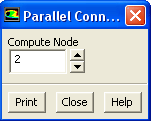
To obtain connectivity information for a compute node, you can use the Parallel Connectivity dialog box (Figure 32.6.1).
Parallel
 Network
 Show Connectivity...
Indicate the compute node ID for which connectivity information is desired in the Compute Node field, and then click the Print button. Sample output for compute node 0 is shown below:
------------------------------------------------------------------------------ ID Comm. Hostname O.S. PID Mach ID HW ID Name ------------------------------------------------------------------------------ host hp balin Linux-32 17272 0 7 Fluent Host n3 hp balin Linux-32 17307 1 10 Fluent Node n2 hp filio Linux-32 17306 0 -1 Fluent Node n1 hp bofur Linux-32 17305 0 1 Fluent Node n0* hp balin Linux-32 17273 2 11 Fluent Node |
O.S is the architecture, Comm. is the communication library (i.e., MPI type), PID is the process ID number, Mach ID is the compute node ID, and HW ID is an identifier specific to the interconnect used.
Previous:
32.5.8 Load Distribution