![[ANSYS, Inc. Logo]](fluentlogo.gif)


|
|
|
The Parallel/Network/Show Connectivity... menu item opens the Parallel Connectivity dialog box.
Parallel Connectivity Dialog Box
The Parallel Connectivity dialog box prints the connectivity of the selected compute node. See Section 32.6 for details.
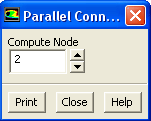
Controls
Previous:
34.9.4 Parallel/Network/Configure...