![[ANSYS, Inc. Logo]](fluentlogo.gif)


|
|
|
Solution steering is disabled by default. However, when the following criteria are met, the solution steering feature will become available for selection:
| Feature | Setting |
| Solver Type | Density Based |
| Solver Formulation | Implicit |
| Time Formulation | Steady |
| Data is valid (either data file has been read | |
| or flow has been initialized) |
To activate solution steering, click the Solution Steering check box as shown in Figure 26.19.1.
The Run Calculation task page will then expand to display the solution steering main controls (see Figure 26.19.1). To obtain a flow solution using solution steering, you will need to perform the following:
The user can also adjust the number of iterations, or customize the parameters of the solution steering if the default setting is not sufficient for the type of flow problem being solved.
Before using solution steering, you will need to prepare and set up the case as usual as described in the separate Getting Started Manual.
Once Solution Steering is activated, specify the following:
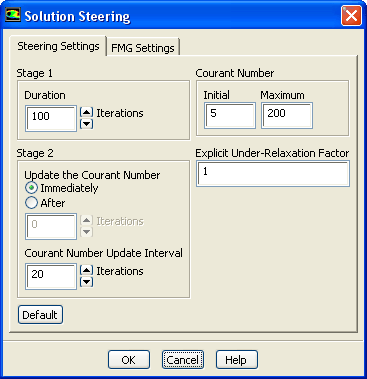
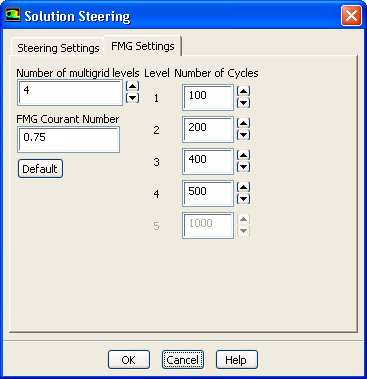
The Solution Steering dialog box, shown in Figure 26.19.2, contains two tabs. The Steering Settings tab sets the solution steering parameters and the FMG Settings sets the full multigrid initialization parameters.
In the Steering Setting tab, you can modify the parameters used in Stages 1 and 2.
Duration is the number of iterations in stage 1. The CFL number used during these iterations is set in the Initial field, in the Courant Number group box.
The Courant number update in stage 2 can start immediately after the end of stage 1, or after a certain designated number of iterations. If the Courant number update is to start immediately after stage 1 then Immediately should be selected (this is the default option). If the Courant number update is desired after some lagged period of iterations, then After should be selected and the lag in the number of iterations should be entered in the field below it. The frequency at which the Courant number is updated is defined in Courant Number Update Interval field.
Initial is the starting Courant number and Maximum is the maximum allowed Courant number. The solution steering algorithm will not allow the solver to exceed the maximum Courant number, but will allow the solver to use a Courant number less than the initial Courant number if divergence in the solution has occurred.
In the FMG Settings tab (Figure 26.19.3), the Number of multigrid levels and Number of Cycles in each Level, as well as the FMG Courant Number used in the FMG initialization can be adjusted. The default values used in the multigrid settings are determined from the type of flow that you selected, the size of the mesh, and the flow dimensionality. The Default button is used to reset any changes to the original default values. For more information about FMG initialization, refer to Section 26.10.
Previous:
26.19.2 Solution Steering Strategy