![[ANSYS, Inc. Logo]](fluentlogo.gif)


|
|
|
For VOF and Eulerian multiphase calculations (using the Explicit scheme), ANSYS FLUENT allows you to use variable time stepping in order to automatically change the time-step when an interface is moving through dense cells or if the interface velocity is high.
Variable time stepping is available for all the explicit schemes of VOF, which includes the donor-acceptor scheme as well. Variable time stepping is not available for the implicit scheme of VOF.
The Variable Time Stepping Algorithm
The global time-step
 is changed in the following manner:
 |
(26.12-1) |
where the ratio
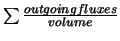 is calculated for each cell.
ANSYS FLUENT takes the maximum of this ratio to calculate the global time step.
is calculated for each cell.
ANSYS FLUENT takes the maximum of this ratio to calculate the global time step.
Specifying Parameters for Variable Time Stepping
For transient VOF calculations, when Variable is selected from the Time Stepping Method drop-down list, in the Run Calculation task page and the Settings... button is clicked, the Variable Time Step Settings dialog box will open (Figure 26.12.7). With the exception of the Global Courant Number field, all parameters are the same as for adaptive time stepping (see Section 26.12.2). The default value for the Global Courant Number is 2.
 |
The variable time step is based on the maximum Courant number near the VOF interface. To calculate that Courant number, ANSYS FLUENT uses a flux-based definition where, in the region near the fluid interface, ANSYS FLUENT divides the volume of each cell by the sum of the outgoing fluxes. The resulting time represents the time it would take for the fluid to empty out of the cell. The smallest such time is used as the characteristic time of transit for a fluid element across a control volume.
Previous:
26.12.2 Adaptive Time Stepping