![[ANSYS, Inc. Logo]](fluentlogo.gif)


|
|
|
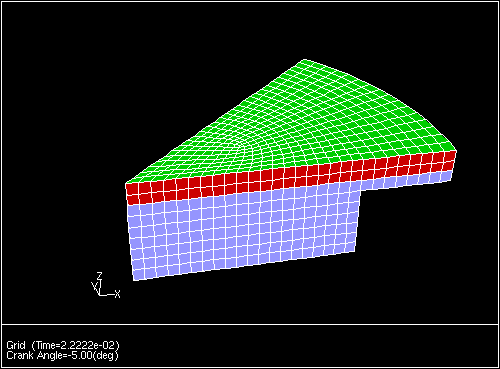
An optical experimental engine [ 18] is used below to show a working example of how to use the crevice model as it is implemented in ANSYS FLUENT. The mesh at ten crank angle degrees before top center is shown in Figure 20.3.1.
The following example shows the necessary steps to enable the crevice model for a typical in-cylinder flow.
define
 models
/define/models> crevice-model? Enable crevice model? [no] yes /define/models> acoustics/ frozen-flux? sox? addon-module multiphase/ species/ axisymmetric? noniterative-time-advance? steady? crevice-model-controls/ nox? unsteady-1st-order? crevice-model? radiation/ unsteady-2nd-order? dpm/ solidification-melting? viscous/ dynamic-mesh? solver/ energy? soot? |
/define/models> crevice-model-controls

Cylinder bore (m) [0.1] 0.1397

Piston to bore clearance (m) [3.0e-5] 5.08e-05

Piston crevice temperature (K) [400] 433

Piston sector angle (deg) [360] 45

Ring discharge coefficient [0.8] 0.7

Pressure in crankcase (exit pressure) (Pa) [101325]
Write out crevice data to a file? [no] yes

output file name ["crev.out"]

 Available wall threads are: (wall.1 wall wall-8)
   Leaking wall  [] wall.1

Shared boundary  [] wall-8

  Selected boundary threads : (wall.1 wall-8)
Use these zones? [yes] yes

Solve crevice model ? [no] yes

Number of rings [3]
       Width of ring number 0 is: [0.00375]
   Thickness of ring number 0 is: [0.0015]
     Spacing of ring number 0 is: [0.008]
Land Length for ring number 0 is: [0.00391]
     Top Gap of ring number 0 is: [6e-05]
  Middle Gap of ring number 0 is: [4e-05]
  Bottom Gap of ring number 0 is: [6e-05]

       Width of ring number 1 is: [0.00375]
   Thickness of ring number 1 is: [0.0015]
     Spacing of ring number 1 is: [0.008]
Land Length for ring number 1 is: [0.00391]
     Top Gap of ring number 1 is: [6e-05]
  Middle Gap of ring number 1 is: [4e-05]
  Bottom Gap of ring number 1 is: [6e-05]

       Width of ring number 2 is: [0.00375]
   Thickness of ring number 2 is: [0.0015]
     Spacing of ring number 2 is: [0.00391]
Land Length for ring number 2 is: [0.00391]
     Top Gap of ring number 2 is: [6e-05]
  Middle Gap of ring number 2 is: [4e-05]
  Bottom Gap of ring number 2 is: [6e-05]


Initial conditions in ring pack
       Pressure 1 is: [4600623.5]
       Pressure 2 is: [4173522.5]
       Pressure 3 is: [3689110.5]
       Pressure 4 is: [3130620]
       Pressure 5 is: [2214841.8]
|
A fast way to set up multiple rings in the ring pack is to specify only one ring and enter the geometry. Once the ring geometry is entered, invoke the crevice-model- controls menu a second time and specify the number of rings desired. When the number of rings changes, the geometry from the first ring is copied to all subsequent rings. Default values can be taken for the rest of the way through the menu structure.
A summary of the crevice model is printed out by entering the (crevice-summary) command at the command prompt:
>(crevice-summary)

              crevice/n-rings : 3
           crevice/ring-width : (0.00375 0.00375 0.00375)
       crevice/ring-thickness : (0.0015 0.0015 0.0015)
            crevice/ring-mass : (0.00375 0.00375 0.00375)
         crevice/ring-spacing : (0.008 0.008 0.00391)
          crevice/land-length : (0.00391 0.00391 0.00391)
         crevice/top-ring-gap : (6e-05 6e-05 6e-05)
         crevice/mid-ring-gap : (4e-05 4e-05 4e-05)
         crevice/bot-ring-gap : (6e-05 6e-05 6e-05)
   crevice/piston-temperature : 433
         crevice/sector-angle : 45
           crevice/mid-gap-cd : 0.7
        crevice/exit-pressure : 101325
              crevice/threads : (5 6)
     names of crevice/threads : (wall.1 wall-8)
        crevice/unit-roundoff : 5.9604645e-08
crevice/piston-bore-clearance : 5.08e-05
               crevice/write? : #t
          crevice/output-file : crev.out
               crevice/solve? : #t
             crevice/enabled? : #t
            crevice/pressures : (4600623.5 4173522.5 3689110.5 3130620 2214841)
|
Previous:
20.3 Crevice Model