[ANSYS, Inc. Logo] return to home search
next up previous contents index

20.2.1 Using the Autoignition Models

To activate the autoignition model, perform the following steps:

1.   Select Transient from the Time list in the General task page.

2.   Select an appropriate reaction model in the Species Model dialog box.

figure Models figure figure Species figure Edit...

3.   The models in the Species Model dialog box that are compatible with the autoignition model are Species Transport, Premixed Combustion, and Partially Premixed Combustion.

figure   

If you select Species Transport, you must also enable the Volumetric option in the Reactions group box.

figure   

The Premixed Combustion and Partially Premixed Combustion models are only available for turbulent flows using the pressure-based solver.

4.   The Autoignition model will now appear in the Models task page.

figure Models figure figure Autoignition figure Edit...

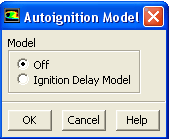
  • If Species Transport is selected in the Species Model dialog box, you can only select the Ignition Delay Model.

    Figure 20.2.1: The Ignition Delay Model in the Autoignition Model Dialog Box
    figure

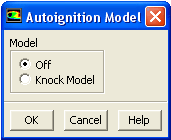
  • If Premixed Combustion is selected in the Species Model dialog box, you can only select the Knock Model.

    Figure 20.2.2: The Knock Model in the Autoignition Model Dialog Box
    figure

  • If Partially Premixed Combustion is selected in the Species Model dialog box, you can select either the Knock Model or the Ignition Delay Model.

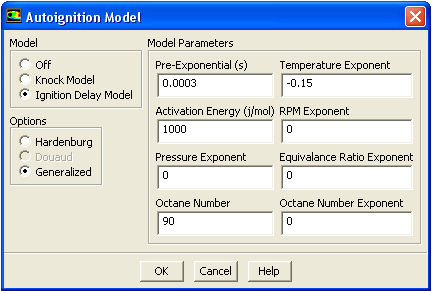
5.   When the Ignition Delay Model is enabled, the dialog box expands to include the modeling parameters for this model (Figure  20.2.3). The two correlation options that exist with this model are Hardenburg and Generalized. Depending on which correlation option is selected, the appropriate modeling parameters will appear in the dialog box.

Figure 20.2.3: The Ignition Delay Model for the Partially Premixed Combustion Model
figure

  • The Hardenburg option is typically used for heavy duty diesel engines. A Fuel Species is selected from the drop-down list and the Pre-Exponential, Pressure Exponent, Activation Energy, and Cetane Number are entered using the GUI. Default values of these parameters can be found in this table in the separate Theory Guide.

  • The Generalized option is described by this equation in the separate Theory Guide. Similarly to the Hardenburg option, a Fuel Species is selected from the drop-down list and the Pre-Exponential, Temperature Exponent, Activation Energy, RPM Exponent, Pressure Exponent, Equivalence Ratio Exponent, Octane Number, and Octane Number Exponent are entered using the GUI.

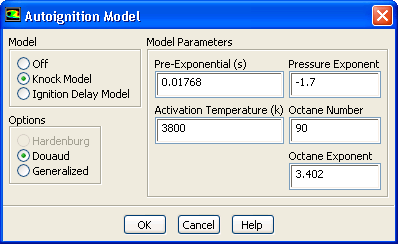
6.   When the Knock Model is enabled, the dialog box expands to include modeling parameters for this model (Figure  20.2.4). The two correlation options that exist with this model are Douaud and Generalized. Depending on which correlation option is selected, the appropriate modeling parameters will appear in the dialog box.

Figure 20.2.4: The Knock Model with the Partially Premixed Combustion Model Enabled
figure

  • The Douaud option is used for knock in SI engines. The modeling parameters that are specified in the GUI for this option are the Pre-Exponential, Pressure Exponent, Activation Temperature, Octane Number, and Octane Exponent ( this equation in the separate Theory Guide).

  • The Generalized option ( this equation in the separate Theory Guide) in the knock model requires the same parameters as in the ignition delay model.


next up previous contents index Previous: 20.2 Autoignition Models
Up: 20.2 Autoignition Models
Next: 20.3 Crevice Model
Release 12.0 © ANSYS, Inc. 2009-01-29