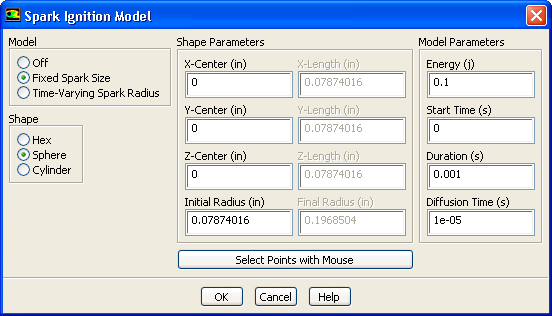
To activate the spark model, perform the following steps:
1.
Select
Transient from the
Time list in the
General task page.
2.
Select an appropriate reaction model in the
Species Model dialog box.
ModelsSpeciesEdit...
3.
Select
Species Transport under
Model in the
Species Model dialog box and enable
Volumetric under
Reactions.
4.
The
Spark Ignition model will now appear in the
Models task page. Select the
Spark Ignition model and click
Edit.... This will open the
Spark Ignition Model dialog box
.
ModelsSpark IgnitionEdit...
Figure 20.1.1: The
Spark Ignition Model Dialog Box
5.
Define the spark model as either
Fixed Spark Size or
Time-Varying Spark Radius.
When the
Fixed Spark Size is enabled, the dialog box expands to include the main spark model inputs (Figure
20.1.2). The shape of the spark can be spherical, cylindrical or hexahedral in three dimensional simulations, or circular or quadrilateral in two dimensional simulations. Depending on the shape selected, appropriate inputs are highlighted or grayed out.
Figure 20.1.2: The Expanded
Spark Ignition Model Dialog Box
To define a spherical spark, the shape parameters can be selected by clicking the
Select Points with Mouse button at the bottom of the dialog box, and highlighting the center and radius of the spark kernel.
Enter
Energy,
Start Time,
Duration, and
Diffusion Time in the
Spark Ignition Model dialog box.
When the in-cylinder model is turned on, the
Start Time is entered in crank angle degrees instead of seconds (as shown in Figure
20.1.2), while the spark
Duration is still in seconds.
While the
Energy input is in Joules by default, you can redefine the units as needed. The rate of energy input into the domain is constant so that the total energy will be evenly distributed over the duration that you set. The
Energy input in the spark model should result in an appropriate temperature rise in the cell that is high enough to initiate combustion. The
Energy input is only a model parameter and does not reflect energy input in actual automotive ignition systems, which typically range between 50 and 150 millijoules.
If you select the
Time-Varying Spark Radius option, you will need to specify the
Energy,
Start Time,
Duration,
Diffusion Time, and
Time Exponent. The spark is assumed spherical and will grow from an
Initial Radius,
, to a
Final Radius,
, over the spark
Duration, with a cube root dependence on time so that the radius will grow faster at the beginning and more slowly near the end. This time-dependent behavior is consistent with experimental findings [
31]. The
Time-Varying Spark Radius option is recommended as it has been found to be less sensitive to model parameters.
![[ANSYS, Inc. Logo]](fluentlogo.gif)


 Models

 Species
 Edit...
 Models

 Spark Ignition
 Edit...
 , to a
Final Radius,
, to a
Final Radius,
 , over the spark
Duration, with a cube root dependence on time so that the radius will grow faster at the beginning and more slowly near the end. This time-dependent behavior is consistent with experimental findings [
31]. The
Time-Varying Spark Radius option is recommended as it has been found to be less sensitive to model parameters.
, over the spark
Duration, with a cube root dependence on time so that the radius will grow faster at the beginning and more slowly near the end. This time-dependent behavior is consistent with experimental findings [
31]. The
Time-Varying Spark Radius option is recommended as it has been found to be less sensitive to model parameters.