![[ANSYS, Inc. Logo]](fluentlogo.gif)


|
|
|
If your model involves coal combustion, the fuel and secondary stream compositions can be input in one of several ways. You can use a single mixture fraction (fuel stream) to represent the coal, defining the fuel composition as a mixture of volatiles and char (solid carbon). Alternatively, you can use two mixture fractions (fuel and secondary streams), defining the volatiles and char separately. In two-mixture-fraction models for coal combustion, the fuel stream represents the char and the secondary stream represents volatiles. This section describes the modeling options and special input procedures for coal combustion models using the non-premixed approach.
There are three options for coal combustion:
|
|
Using two mixture fractions to model coal combustion is more accurate than using one mixture fraction as the volatile and char streams are modeled separately. However, the two-mixture-fraction model incurs significant additional computational expense since the multi-dimensional PDF integrations are performed at run-time.
|
|
|
Using a single mixture fraction for coal combustion is less accurate than using two mixture fractions. However, convergence in
ANSYS FLUENT should be substantially faster than the two-mixture-fraction model.
|
Defining the Coal Composition: Single-Mixture-Fraction Models
When coal is modeled using a single mixture fraction (the fuel stream), the fuel stream composition can be input using the conventional approach or the empirical fuel approach.
To use the conventional approach, you will need to define the mixture of species in the coal and their mole or mass fractions in the fuel stream. Use the
Boundary tab in the
Species Model dialog box to input the list of species (e.g., C
 H
H
 , CH
, CH
 , CO, CO
 , C(s)) that approximate the coal composition, and their mole or mass fractions.
Note that C(s) is used to represent the char content of the coal. For example, consider a coal that has a molar composition of 40% volatiles and 60% char on a dry ash free (DAF) basis. Assuming the volatiles can be represented by an equimolar mixture of C
 H
H
 and CO, the fuel stream composition defined in the
Boundary tab would be C
and CO, the fuel stream composition defined in the
Boundary tab would be C
 H
H
 =0.2, CO = 0.2, and C(s)=0.60. Note that the coal composition should always be defined on an ash-free basis, even if ash will be considered in the
ANSYS FLUENT calculation.
=0.2, CO = 0.2, and C(s)=0.60. Note that the coal composition should always be defined on an ash-free basis, even if ash will be considered in the
ANSYS FLUENT calculation.
To define ash properties, go to the Create/Edit Materials dialog box and select combusting-particle as the Material Type.
The following table illustrates the conversion from a typical mass-based proximate analysis to the species fraction inputs required by ANSYS FLUENT. Note that the conversion requires that you make an assumption regarding the species representing the volatiles. Here, the volatiles are assumed to exist as an equimolar mix of propane and carbon monoxide.
| Proximate Analysis
|
Weight %
|
Mass
Fraction (DAF) |
Moles
(DAF) |
Mole Fraction
(DAF) |
| Volatiles
- C  H H

- CO Fixed Carbon (C(s)) Ash |
30
60 10 |
0.2035 0.1295 0.667 - |
0.004625 0.004625 0.05558 - |
0.07134 0.07134 0.85732 - |
| (Total) | 0.06483 | 1.0 |
Moisture in the coal
can be considered by adding it in the fuel composition as liquid water, H
 O(l). The moisture can also be defined as water vapor, H
 O, provided that the corresponding latent heat is included in the discrete phase material inputs in
ANSYS FLUENT. If the liquid water is used as a boundary species, it should be removed from the list of excluded species (see Section
16.5.1).
O, provided that the corresponding latent heat is included in the discrete phase material inputs in
ANSYS FLUENT. If the liquid water is used as a boundary species, it should be removed from the list of excluded species (see Section
16.5.1).
|
|
Note that if water is included in the coal, the water release is not modeled as evaporation, which is typically the case in the wet combustion model, described in Section
23.3.2.
|
To use the empirical approach, enable the Empirical Fuel Stream option in the Chemistry tab. This method is ideal if you have an elemental analysis of the coal.
In the Chemistry tab, input the lower heating value and mean specific heat of the coal. ANSYS FLUENT will use these inputs to determine the mole fractions of the chemical species you have included in the system. Then, in the Boundary tab, define the atom fractions of C, H, N, S, and O in the fuel stream.
Note that for both of these composition input methods, you should take care to distinguish atomic carbon, C, from solid carbon, C(s). Atomic carbon should only be selected if you are using the empirical fuel input method.
See Section 16.4.5 for details about further inputs for modeling coal combustion.
Defining the Coal Composition: Two-Mixture-Fraction Models
You can model coal using the two mixture fractions model, where the primary stream represents the char and the secondary stream represents the volatiles.
As in single-mixture-fraction cases, the fuel stream and secondary stream compositions in a two-mixture-fraction case can be input using either the conventional approach or the empirical fuel approach.
To use the conventional approach, you will need to define the mixture of species in the coal and their mole or mass fractions in the fuel and secondary streams.
Use the
Boundary tab of
Species Model dialog box to define the mole or mass fractions of volatile species in the secondary stream (e.g., C
 H
H
 , CH
, CH
 , CO, CO
 , C(s)). Next, define the mole or mass fractions of species used to represent the char. Generally, you will input 100% C(s) for the fuel stream.
To use the empirical fuel approach, enable the Empirical Secondary Stream option in the Chemistry tab for the volatile (secondary) stream. This method is ideal if you have an elemental analysis of the coal.
In the Chemistry tab, input the lower heating value and mean specific heat of the coal. Then, in the Boundary tab, define the mole or mass fractions of species used to represent the char. Generally, you will input 100% C(s) for the fuel stream. Finally, define the atom fractions of C, H, N, S, and O in the volatiles. ANSYS FLUENT will use these inputs to determine the mole fractions of the chemical species you have included in the system. For example, consider coal with the following DAF (dry ash free) data and elemental analysis:
| Proximate Analysis | Wt % (dry) | Wt % (DAF) |
| Volatiles | 28 | 30.4 |
| Char (C(s)) | 64 | 69.6 |
| Ash | 8 | - |
| Element | Wt % (DAF) | Wt % (DAF) |
| C | 89.3 | 89.3 |
| H | 5.0 | 5.0 |
| O | 3.4 | 3.4 |
| N | 1.5 | 2.3 |
| S | 0.8 | - |
(Note that in the final column, for modeling simplicity, the sulfur content of the coal has been combined into the nitrogen mass fraction.)
You can combine the proximate and ultimate analysis data to yield the following elemental composition of the volatile stream:
| Element | Mass | Mass Fraction | Moles | Mole Fraction |
| C | (89.3 - 69.6) | 0.65 | 5.4 | 0.24 |
| H | 5.0 | 0.16 | 16 | 0.70 |
| O | 3.4 | 0.11 | 0.7 | 0.03 |
| N | 2.3 | 0.08 | 0.6 | 0.03 |
| Total | 30.4 | 22.7 |
This adjusted composition is used to define the secondary stream (volatile) composition.
The lower heating value of the volatiles can be computed from the known heating value of the coal and the char (DAF):
 = 35.3 MJ/kg
 = 32.9 MJ/kg
 You can compute the heating value of the volatiles as

or

Note that for both of these composition input methods, you should take care to distinguish atomic carbon, C, from solid carbon, C(s). Atomic carbon should only be selected if you are using the empirical fuel input method.
Additional Coal Modeling Inputs in
ANSYS FLUENT
Within ANSYS FLUENT, the DPM coal combustion simulation is defined as usual when the non-premixed combustion model is selected. The air (oxidizer) inlets are defined as having a mixture fraction value of zero. No gas phase fuel inlets will be included and the sole source of fuel will come from the coal devolatilization and char burnout. The coal particles are defined as injections using the Set Injection Properties dialog box in the usual way, and physical properties for the coal material are specified as described in Section 23.5. You should keep in mind the following issues when defining injections and discrete-phase material properties for coal materials:
 by default.
The specification of the char and volatile streams differs depending on the type of model you are defining:
 to yield CO. The
Latent Heat input determines the heat required to generate the vapor phase volatiles defined in the non-premixed system chemistry. You can usually set this value to zero when the non-premixed model is used, since your definition of volatile species will have been based on the overall heating value of the coal. However, if the coal composition includes the water content, the latent heat should be set as follows:
to yield CO. The
Latent Heat input determines the heat required to generate the vapor phase volatiles defined in the non-premixed system chemistry. You can usually set this value to zero when the non-premixed model is used, since your definition of volatile species will have been based on the overall heating value of the coal. However, if the coal composition includes the water content, the latent heat should be set as follows:
 10
10
 J/kg), adjusted by the mass loading of water in the volatiles, if the water content of the coal has been defined using water vapor,
H2O. In this case, the water content you defined will be evolved along with the other species in the coal but the system chemistry does not include the latent heat effect.
J/kg), adjusted by the mass loading of water in the volatiles, if the water content of the coal has been defined using water vapor,
H2O. In this case, the water content you defined will be evolved along with the other species in the coal but the system chemistry does not include the latent heat effect.
Postprocessing Non-Premixed Models of Coal Combustion
ANSYS FLUENT reports the rate of volatile release from the coal using the DPM Evaporation/Devolatilization postprocessing variable. The rate of char burnout is reported in the DPM Burnout variable.
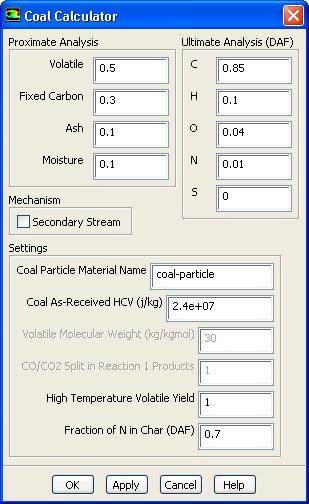
The Coal Calculator
The Coal Calculator dialog box automates the calculations described above for setting up a coal case from the proximate and ultimate analyses.
The inputs to the Coal Calculator dialog box are:
 , and an empirical secondary stream representing the volatiles.
When the OK button is clicked, ANSYS FLUENT makes the following changes:
 ) is calculated as follows. First the DAF LCV of the coal is computed as,
where
 and
and
 are the proximate moisture and ash fractions,
 is the ultimate
 fraction,
 and
and
 are the molecular weight of water and atomic hydrogen, respectively, and
 is the latent heat of water.
 is calculated from
 using,
where
 and
and
 are the proximate fixed carbon and volatile fractions, respectively.
After the Coal Calculator has set up the relevant models, you must build the PDF Table by clicking Calculate PDF Table in the Table tab. You will also need to create injections if you have not done this yet. After converging your coal combustion case, you may want to enable the NOx model for post-processing nitrogen-oxide pollutants.
Previous:
16.4.4 Modeling Liquid Fuel