![[ANSYS, Inc. Logo]](fluentlogo.gif)


|
|
|
During a typical session, ANSYS FLUENT may require feedback from you in the event of a problem it encounters. ANSYS FLUENT usually communicates problems or questions through the use of Error dialog boxes, Warning dialog boxes, or Question dialog boxes. While executing ANSYS FLUENT in batch mode, you may want to suppress this type of interaction in order to, for example, create journal files more easily.
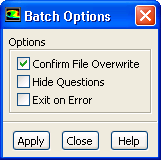
There are three common batch configuration options available to you when running ANSYS FLUENT in batch mode. You can access these options using the Batch Options dialog box .
File
 Batch Options...
The Batch Options dialog box contains the following items:
Note that these options are also available in the file/set-batch-options command in the text interface.
file
 set-batch-options
Any combination of these options can be turned on or off at any given time prior to running in batch mode.
|
|
Batch option settings are
not saved with case files. They are meant to apply for the duration of the current
ANSYS FLUENT session only. If you read in additional mesh or case files during this session, the batch option settings will not be altered. As batch options are not saved with case files, journal files developed for use in batch mode should begin by enabling the desired batch option settings (if different from the default settings).
|
Previous:
1.2.2 Background Execution on