[ANSYS, Inc. Logo] return to home search
next up previous contents index

34.1.69 File/Batch Options...

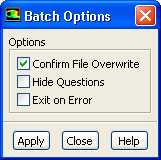
The File/Batch Options... menu item opens the Batch Options dialog box.


Batch Options Dialog Box


The Batch Options dialog box allows you to select options to suppress interactive dialog boxes from ANSYS FLUENT while running a case in batch mode. See Section  1.2.3 for details.
figure

Controls

Confirm File Overwrite   determines whether ANSYS FLUENT confirms a file overwrite. This option is enabled by default.

Hide Questions   allows you to hide Question dialog boxes. This option is disabled by default.

Exit on Error   allows you to automatically exit from batch mode when an error occurs. This option is disabled by default.


next up previous contents index Previous: 34.1.68 File/Data File Quantities...
Up: 34.1 File Menu
Next: 34.1.70 File/RSF...
Release 12.0 © ANSYS, Inc. 2009-01-29