![[ANSYS, Inc. Logo]](fluentlogo.gif)


|
|
|
ANSYS FLUENT's Remote Simulation Facility (RSF) is a highly secure mechanism for executing large, complex simulations at a remote data center. You can use ANSYS FLUENT to access the RSF using the File menu.
File
 RSF...
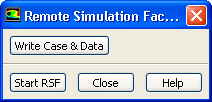
When you select this option, ANSYS FLUENT displays the Remote Simulation Facility dialog box (Figure 1.1.7).
If a case and data file are already loaded into ANSYS FLUENT, the Write Case & Data button will be active, which will allow you to write out the case and data files for the current session. You must save your case and data files in order to use them on the RSF. Once you save the case and data files and launch the RSF, you can exit from ANSYS FLUENT.
To start an RSF session, click Start RSF to open your web browser and load the page for the ANSYS FLUENT Remote Simulation Facility (RSF).
For more information about the RSF, see http://www.ansys.com/support/remotesimulation.
|
|
To link to the RSF on Linux/UNIX platforms, you must first have installed the
ANSYS FLUENT 12.x documentation, which contains the files necessary to launch your browser so you can automatically view the appropriate web pages.
|
Previous:
1.1.5 Command Line Startup