The
Turbo/Averaged Contours... menu item opens the
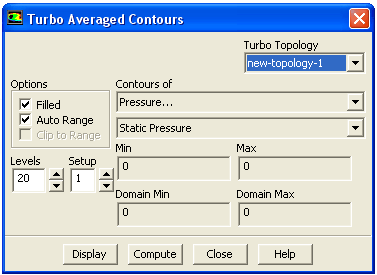
Turbo Averaged Contours dialog box.
Turbo Averaged Contours Dialog Box
The
Turbo Averaged Contours dialog box allows you display turbomachinery-specific circumferentially averaged contours of variables projected on an
-
plane. See Section
29.10.3 for details.
Controls
Turbo Topology
contains a list of defined topologies. Select from the list to display the values for the selected topology.
Options
contains the check buttons that set various contour display options.
Filled
toggles between filled contours and line contours.
Auto Range
toggles between automatic and manual setting of the contour range. Any time you change the
Contours of selection,
Auto Range is reset to on.
Clip to Range
determines whether or not values outside the prescribed
Min/
Max range are contoured when using
Filled contours. If selected, values outside the range will not be contoured. If not selected, values below the
Min value will be colored with the lowest color on the color scale, and values above the
Max value will be colored with the highest color on the color scale. See Section
29.1.2 for details.
Levels
sets the number of contour levels that are displayed.
Setup
indicates the ID number of the contour setup. For frequently used combinations of contour fields and options, you can store the information needed to generate the contour plot by specifying a
Setup number and setting up the desired information in the dialog box. See Section
29.1.2 for details.
Contours of
contains a list from which you can select the scalar field to be contoured.
Min
shows the minimum value of the scalar field. If
Auto Range is off, you can set the minimum by typing a new value.
Max
shows the maximum value of the scalar field. If
Auto Range is off, you can set the maximum by typing a new value.
Domain Min
shows the global minimum value of the scalar field for the entire domain.
Domain Max
shows the global maximum value of the scalar field for the entire domain.
Display
draws the contours in the active graphics window.
Compute
calculates the scalar field and updates the
Min and
Max values (even when
Auto Range is off).
![[ANSYS, Inc. Logo]](fluentlogo.gif)


 -
-
 plane. See Section
29.10.3 for details.
plane. See Section
29.10.3 for details.