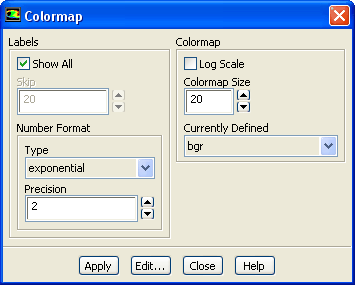
The
Colormap dialog box allows you to select and modify existing colormaps. See Section
29.2.5 for details.
Controls
Labels
allows you to customize the display of your colormap labels.
Show All
Enable this option if you want all the labels to show alongside the colormap. Disable if you want to skip some of the label displays.
Skip
sets the number of labels to be skipped.
Number Format
contains controls for changing the format of the labels on the color scale. These labels are the character strings used to define the color divisions at the left of the graphics window.
Type
sets the form of the labels. You may select from a drop-down list of options, including the following:
general
displays the real value with either float or exponential form based on the size of the number and the defined
Precision.
float
displays the real value with an integral and fractional part (e.g., 1.0000), where the number of digits in the fractional part is determined by
Precision.
exponential
displays the real value with a mantissa and exponent (e.g., 1.0e-02), where the number of digits in the fractional part of the mantissa is determined by
Precision.
Precision
defines the number of fractional digits displayed in the labels.
Colormap
contains controls for the colormap size and scale, and for selection of a defined colormap.
Log Scale
enables the use of a logarithmic scale for the color scale (rather than the default decimal scale). See Section
29.2.5 for details.
Colormap Size
specifies the number of distinct colors in the colormap. You may specify from 2 to 100 colors.
Currently Defined
contains a drop-down list of all pre-defined colormaps and all custom colormaps defined by you. Select the colormap to be used from this list.
![[ANSYS, Inc. Logo]](fluentlogo.gif)