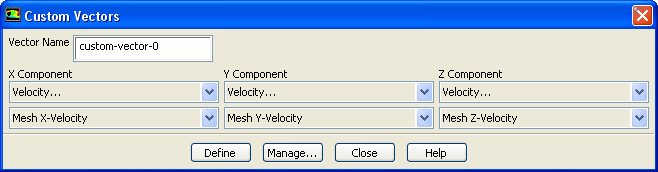
The
Custom Vectors dialog box allows you to define custom vectors based on existing quantities. Any vectors that you define will be added to the
Vectors of list in the
Vectors dialog box. To open the
Custom Vectors dialog box, click
Custom Vectors... in the
Vectors dialog box. See Section
29.1.3 for details about custom vectors.
Controls
Vector Name
specifies the name of the vector you are defining. Should you decide to change the name after you have defined the vector, you can do so in the
Vector Definitions dialog box, which you can open by clicking on the
Manage... button.
X, Y, Z Component
specify the
,
, and
components of the vector. Each drop-down list contains the available field functions.
Define
creates the vector and adds it to the
Vectors of list in the
Vectors dialog box.
Manage...
opens the
Vector Definitions dialog box, which enables you to check, rename, save, load, and delete custom vectors.
![[ANSYS, Inc. Logo]](fluentlogo.gif)


 ,
,
 , and
, and
 components of the vector. Each drop-down list contains the available field functions.