The
Variable Time Step Settings dialog box contains parameters related to variable time stepping. See Section
26.12.3 for details.
Controls
Global Courant Number
allows you to specify the Courant number. The default value for the
Global Courant number is 2.
Ending Time
specifies an ending time for the calculation. Since the ending time cannot be determined by multiplying the number of time steps by a fixed time step size, you need to specify it explicitly.
Minimum/Maximum Time Step Size
specify the upper and lower limits for the size of the time step. If the time step becomes very small, the computational expense may be too high; if the time step becomes very large, the solution accuracy may not be acceptable to you. You can set the limits that are appropriate for your simulation.
Minimum/Maximum Step Change Factor
limit the degree to which the time step size can change at each time step. Limiting the change results in a smoother calculation of the time step size, especially when high-frequency noise is present in the solution. If the time step change factor,
, is computed as the ratio between the specified truncation error tolerance and the computed truncation error, the size of time step
is computed as follows:
If
,
is increased to meet the required tolerance.
If
,
is increased, but its maximum possible value is
.
If
,
is unchanged.
If
,
is decreased.
Number of Fixed Time Steps
specifies the number of fixed-size time steps that should be performed before the size of the time step starts to change. The size of the fixed time step is the value specified for
Time Step Size under
Time.
User-Defined Time Step
contains a drop-down list of available user-defined functions.
![[ANSYS, Inc. Logo]](fluentlogo.gif)


 , is computed as the ratio between the specified truncation error tolerance and the computed truncation error, the size of time step
 is computed as follows:
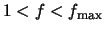 ,
,
 is increased to meet the required tolerance.
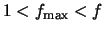 ,
,
 is increased, but its maximum possible value is
 .
.
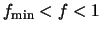 ,
,
 is unchanged.
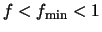 ,
,
 is decreased.