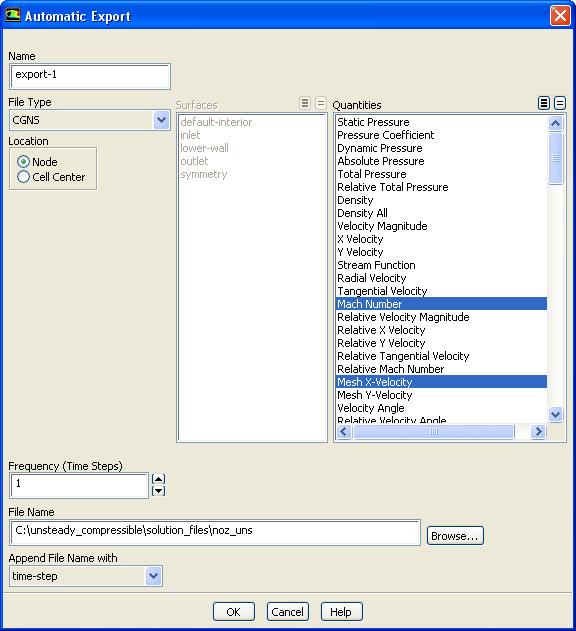
The
Automatic Export dialog box allows you to create an automatic export definition for solution data. See Section
4.16.1 for details.
Controls
Name
specifies the name of the export definition.
File Type
contains a drop-down list of file types, which control the output file format that will be written.
ABAQUS
allows you to specify the surface(s) and optional loads, based on the kind of finite element analysis selected, to be exported to an
ABAQUS file (extension
.inp).
ASCII
allows you to specify the surface(s), scalars, location from which the values of scalar functions are to be taken, and the delimiter separating the fields, to be exported to an
ASCII file.
AVS
allows you to specify the scalars you want to write to be exported to an AVS file.
CFD-Post Compatible
allows you to specify the scalars you want to write to be exported to a file compatible to the
CFD-Post application.
CGNS
allows you to specify the scalars you want to write and the location from which the values of scalar functions are to be taken, to be exported to a
CGNS file (extension
.cgns).
Data Explorer
allows you to specify the surface(s) and the scalars you want to write to be exported to a
Data Explorer file (extension
.dx).
EnSight Case Gold
allows you to specify the scalars you want to write, the location from which the values of scalar functions are to be taken, and the file format, to be exported to an
EnSight file (extension
.geo,
.vel,
.scl1, or
.encas).
FAST
allows you to specify the scalars you want to write, to be exported as a grid file (Plot3D format), a velocity file, and a scalar file. This option is available only for a triangular or tetrahedral mesh.
FAST Solution
allows you to export a single file containing density, velocity, and total energy data. This option is available only for a triangular or tetrahedral mesh.
Fieldview Unstructured
allows you to specify the scalars you want to write, to be exported to a
FIELDVIEW binary file (extension
.fvuns) and a regions file (extension
.fvuns.fvreg).
I-deas Universal
allows you to specify the surface(s), scalars, and optional loads, based on the kind of finite element analysis selected, to be exported to an
I-deasUniversal file.
Mechanical APDL Input
allows you to specify the surface(s) and optional loads, based on the kind of finite element analysis selected, to be exported to a
Mechanical APDL Input file (extension
.cdb).
NASTRAN
allows you to specify the surface(s), scalars, and optional loads, based on the kind of finite element analysis selected, to be exported to a
NASTRAN file (extension
.bdf).
PATRAN
allows you to specify the surface(s), scalars, and optional loads, based on the kind of finite element analysis selected, to be exported to a
PATRAN neutral file (extension
.out).
RadTherm
allows you to specify the surface(s) for which you want to write data and the method of writing the heat transfer coefficient, to be exported to a
PATRAN neutral file (extension
.neu). This option is available only when the
Energy Equation is enabled.
Tecplot
allows you to specify the surface(s) and the scalars you want to write, to be exported to a
Tecplot file.
Surfaces
specifies the surfaces for which data is to be written for an
ABAQUS,
ASCII,
Data Explorer,
I-deasUniversal,
Mechanical APDL Input,
NASTRAN,
PATRAN,
RadTherm, or
Tecplot file.
Quantities
specifies valid quantities for output. The attributes of the list are modified based on the active file type. The list may be a single-selection or a multiple-selection list or it may be disabled, depending on the selected
File Type.
Analysis (for
ABAQUS,
I-deas Universal,
Mechanical APDL Input,
NASTRAN, and
PATRAN formats)
specifies the finite element analysis intended.
Structural
specifies structural analysis and allows you to select the
Structural Loads to be written.
Thermal
specifies thermal analysis and allows you to select the
Thermal Loads to be written.
Structural Loads
contains optional structural loads that can be written to
ABAQUS,
I-deasUniversal,
Mechanical APDL Input,
NASTRAN, and
PATRAN files. This option is available only when
Structural analysis is selected.
Force
enables force to be written as a load for a structural analysis.
Pressure
enables pressure to be written as a load for a structural analysis.
Temperature
enables temperature to be written as a load for a structural analysis. This option is available only when the
Energy Equation is enabled.
Thermal Loads
contains optional thermal loads that can be written to
ABAQUS,
I-deasUniversal,
Mechanical APDL Input,
NASTRAN, and
PATRAN files. This option is available only when
Thermal analysis is selected.
Temperature
enables temperature to be written as a load for a thermal analysis.
Heat Flux
enables heat flux to be written as a load for a thermal analysis.
Heat Trans Coeff
enables heat transfer coefficient to be written as a load for a thermal analysis.
Location (or
ASCII,
CGNS, and
EnSight Case Gold formats)
specifies the location from which the values of scalar functions are to be taken.
Node
specifies that data values at the node points are to be exported.
Cell Center
specifies that data values from the cell centers are to be exported.
Format (for
CFD-Post Compatile and
EnSight Case Gold)
specifies the file format.
Binary
specifies the file format as binary.
ASCII
specifies the file format as ASCII.
Heat Transfer Coefficient (for
RadTherm format only)
specifies the basis for the heat transfer coefficient exported.
Flux Based
specifies the flux based method for writing the heat transfer coefficient.
Wall Function
specifies the wall function based method for writing the heat transfer coefficient.
Frequency (Time Steps)
specifies the frequency for appending the data during the solution process.
File Name
specifies the rootname for the files to be saved.
Append File Name with
allows you to select
flow-time or
time-step to be appended to the file name.
Decimal Places in File Name
allows you to specify the number of decimal digits in the file name. This option is available only when
flow-time is selected in the
Append File Name with drop-down list. The default value for this field is set to
6.
![[ANSYS, Inc. Logo]](fluentlogo.gif)