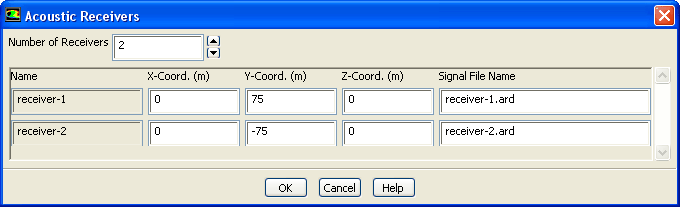
The
Acoustic Receivers dialog box allows you to specify the location of the acoustic receivers. See Section
22.2 for details about the items below.
Controls
Number of Receivers
allows you to specify the total number of receivers for which you want to compute sound.
Name
shows the name of the receiver. If you edit the field, the new name will take effect after you click the
OK button.
X-Coord., Y-Coord., Z-Coord.
specifies the coordinates for each receiver. Note that because
ANSYS FLUENT's acoustics model is ideally suited for far-field noise prediction, the receiver locations you define should be at a reasonable distance from the sources of sound (i.e., the selected acoustic surface), and can fall outside of the computational domain if needed.
Signal File Name
specifies the name of the file used to store sound pressure signals for the corresponding receivers. By default, the files will be named
receiver-1.dat,
receiver-2.dat, etc.
![[ANSYS, Inc. Logo]](fluentlogo.gif)