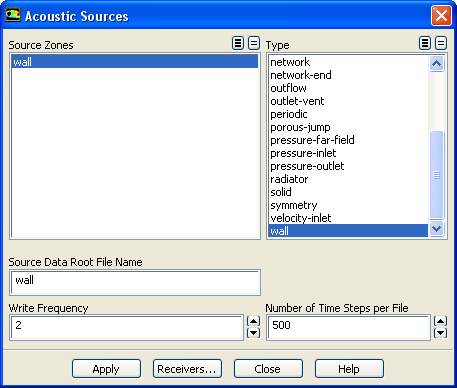
The
Acoustic Sources dialog box allows you to specify the acoustics sources. See Section
22.2 for details about the items below.
Controls
Source Zones
contains a list of zones from which you can select one or more emission (source) surfaces.
Type
contains a list of all possible types of zones from which you can select one or more types of the available zones. If you select an available type of zone, the relevant zones will then be selected in the
Source Zones list. If you specify any valid
interior zones as source surfaces, the
Interior Cell Zone Selection dialog box will appear.
Source Data Root File Name
is used to give the names of the source data files (e.g.,
acoustic_example_xxxx.asd, where
xxxx is the global time-step index of the transient solution) and an index file (e.g.,
acoustic_example.index) that will store the information associated with the source data.
Write Frequency
allows you to control how often the source data will be written. This will enable you to save disk space if the time-step size used in the transient flow simulation is smaller than necessary to resolve the sound frequency you are attempting to predict.
Number of Time Steps per File
allows you to write the source data to multiple files, each containing the source data for a number of time steps specified by you.
![[ANSYS, Inc. Logo]](fluentlogo.gif)