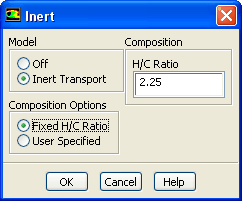
33.3.25 Inert Dialog Box
The
Inert dialog box allows you to set the parameters related to the inert model. For details, see Section
16.7.5.
Controls
-
Model
allows you to enable or disable the inert model.
-
Off
disables the model.
-
Inert Transport
enables the inert model.
-
Composition Options
allows you to select a fixed H/C ratio or to specify the composition.
-
Fixed H/C Ratio
allows you to specify a fixed ratio of hydrogen to carbon in the
H/C Ratio field.
-
User Specified
allows you to specify an arbitrary composition for the inert stream.
-
Composition
allows you to set the H/C ratio or the mass fraction.
When
Fixed H/C Ratio is selected under
Composition Options, the following option(s) are available:
-
H/C Ratio
specifies the fixed ratio of hydrogen to carbon when the
Fixed H/C Ratio option is enabled.
When
User Specified is selected under
Composition Options, the following option(s) are available:
-
Species
lists the inert species name.
-
Mass Fraction
displays the mass fraction of the corresponding species.
-
Inert Species
allows you to specify the name of the inert species.
-
Add
adds the specified inert species to the species list.
-
Remove
removes the specified inert species from the species list.
-
Normalize Species
makes sure the species mass fractions add up to 1.
-
List Available Species
lists all species in the thermodynamic database file (
thermo.db) in the console window,


 Previous:
33.3.24 Autoignition Model Dialog
Previous:
33.3.24 Autoignition Model Dialog
Up:
33.3 Models Task Page
Next:
33.3.26 NOx Model Dialog
Release 12.0 © ANSYS, Inc. 2009-01-29 ![[ANSYS, Inc. Logo]](fluentlogo.gif)