Step 5: Cell Zone Conditions
Cell Zone Conditions
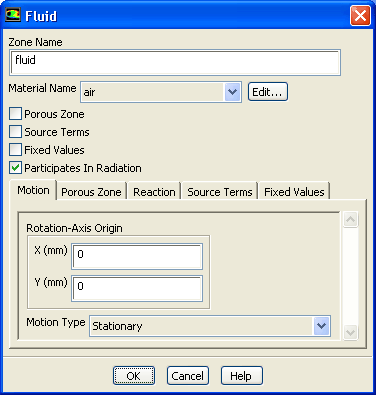
1. Ensure that
air
is selected for fluid.
Cell Zone Conditions
fluid
Edit...
(a) Retain the default selection of
air
from the
Material Name
drop-down list.
(b) Click
OK
to close the
Fluid
dialog box.
2. Set the cell zone conditions for the
lens
.
Cell Zone Conditions
lens
Edit...
(a) Select
lens
from the
Material Name
drop-down list.
(b) Enable
Participates In Radiation
.
(c) Click
OK
to close the
Solid
dialog box.
Previous:
Step 4: Materials
Up:
Using the Discrete Ordinates
Next:
Step 6: Boundary Conditions
Release 12.0 ©
ANSYS, Inc.
2009-02-09
![[ANSYS, Inc. Logo]](fluentlogo.gif)


 Cell Zone Conditions

 Cell Zone Conditions

 fluid
fluid
 Edit...
 Cell Zone Conditions

 lens
lens
 Edit...
 Previous:
Step 4: Materials
Previous:
Step 4: Materials