Step 4: Materials
Materials
1. Set the properties for
air
.
Materials
air
Create/Edit...
(a) Select
incompressible-ideal-gas
from the
Density
drop-down list.
Since pressure variations are insignificant compared to temperature variation, we choose incompressible-ideal-gas law for density.
(b) Retain the default settings for all other parameters.
(c) Click
Change/Create
and close the
Create/Edit Materials
dialog box.
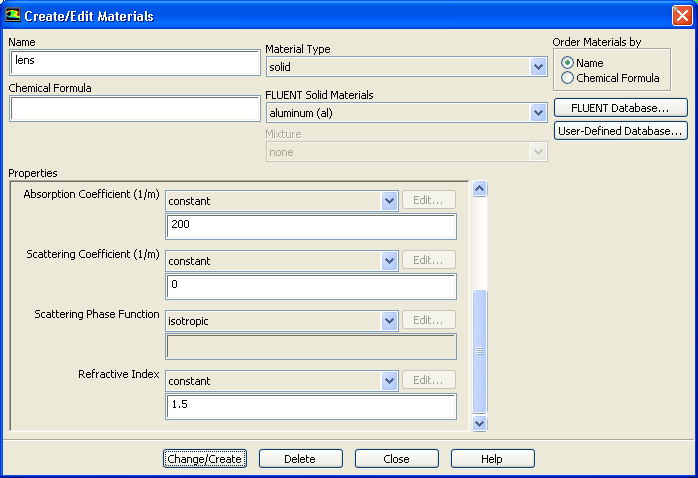
2. Create a new material,
lens
.
Materials
Solid
Create/Edit...
(a) Enter
lens
for
Name
and delete the entry in the
Chemical Formula
field.
(b) Enter
2200
for
Density
.
(c) Enter
830
J/Kg-K for
Cp (Specific Heat)
.
(d) Enter
1.5
W/m-K for
Thermal Conductivity
.
(e) Enter
200
1/m for
Absorption Coefficient
.
(f) Enter
1.5
for
Refractive Index
.
(g) Click
Change/Create
.
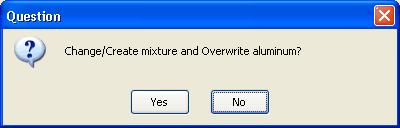
A
Question
dialog box will open, asking if you want to overwrite
aluminum
.
(h) Click
No
in the
Question
dialog box to retain
aluminum
and add the new material (
lens
) to the materials list.
The
Create/Edit Materials
dialog box will be updated to show the new material,
lens
, in the
FLUENT Solid Materials
drop-down list.
(i) Close the
Create/Edit Materials
dialog box.
Previous:
Step 3: Models
Up:
Using the Discrete Ordinates
Next:
Step 5: Cell Zone
Release 12.0 ©
ANSYS, Inc.
2009-02-09
![[ANSYS, Inc. Logo]](fluentlogo.gif)


 Materials
 Materials

 air
air
 Create/Edit...

 Materials

 Solid
Solid
 Create/Edit...
 for
Density.
for
Density.
 Previous:
Step 3: Models
Previous:
Step 3: Models