- 1.
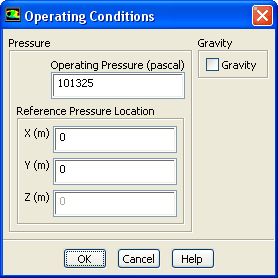
Set the operating pressure.
 Boundary Conditions
 Operating Conditions...
-
The
Operating Conditions dialog box can also be accessed from the
Cell Zone Conditions task page.
- (a)
Retain the default value of
101325 Pa for
Operating Pressure.
-
The operating pressure should be set to a meaningful mean value in order to avoid round-off errors.
- (b)
Click
OK to close the
Operating Conditions dialog box.
For information about setting the operating pressure, see
this section in the separate
User's Guide.


 Previous:
Step 5: Boundary Conditions
Previous:
Step 5: Boundary Conditions
Up:
Modeling External Compressible Flow
Next:
Step 7: Solution
Release 12.0 © ANSYS, Inc. 2009-02-09 ![[ANSYS, Inc. Logo]](fluentlogo.gif)