The default
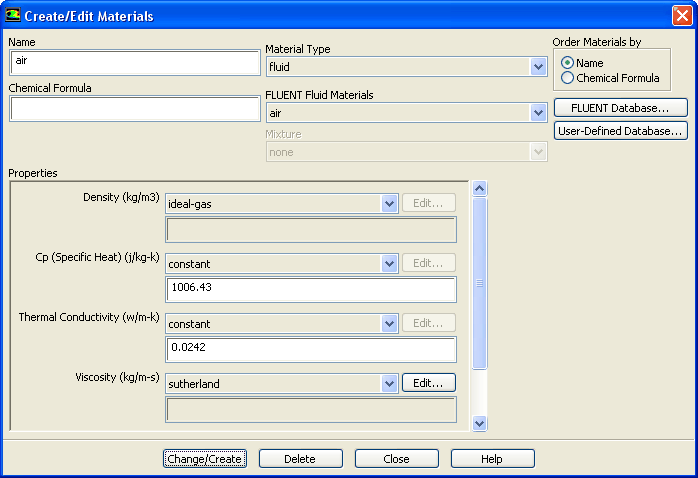
Fluid Material is air, which is the working fluid in this problem. The default settings need to be modified to account for compressibility and variations of the thermophysical properties with temperature.
1.
Set the properties for
air, the default fluid material.
MaterialsairCreate/Edit...
(a)
Select
ideal-gas from the
Density drop-down list.
The
Energy Equation will be enabled.
(b)
Select
sutherland from the
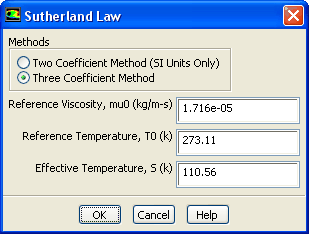
Viscosity drop-down list to open the
Sutherland Law dialog box.
Scroll down the
Viscosity drop-down list to find
sutherland.
i.
Retain the default selection of
Three Coefficient Method in the
Methods list.
ii.
Click
OK to close the
Sutherland Law dialog box.
The Sutherland law for viscosity is well suited for high-speed compressible flows.
(c)
Click
Change/Create to save these settings.
(d)
Close the
Create/Edit Materials dialog box.
While
Density and
Viscosity have been made temperature dependent,
Cp and
Thermal Conductivity have been left constant. For high-speed compressible flows, thermal dependency of the physical properties is generally recommended. For simplicity,
Thermal Conductivity and
Cp are assumed to be constant in this tutorial.
![[ANSYS, Inc. Logo]](fluentlogo.gif)


 Materials
 Materials

 air
air
 Create/Edit...