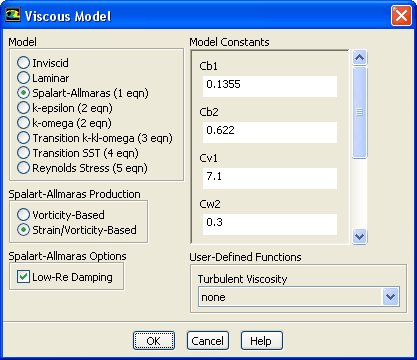
(a)
Select
Spalart-Allmaras (1 eqn) in the
Model list.
(b)
Select
Strain/Vorticity-Based in the
Spalart-Allmaras Production list.
(c)
Retain the default settings in the
Model Constants group box.
(d)
Click
OK to close the
Viscous Model dialog box.
Note:
The Spalart-Allmaras model is a relatively simple one-equation model that solves a modeled transport equation for the kinematic eddy (turbulent) viscosity. This embodies a relatively new class of one-equation models in which it is not necessary to calculate a length scale related to the local shear layer thickness. The Spalart-Allmaras model was designed specifically for aerospace applications involving wall-bounded flows and has been shown to give good results for boundary layers subjected to adverse pressure gradients.
![[ANSYS, Inc. Logo]](fluentlogo.gif)


 Models
 Models

 Viscous
 Edit...