 Materials science
How to use CPMD on ENEA-grid
Application Name: CPMD
Discipline: Computational Materials Science
The CPMD code is a parallelized plane wave/pseudopotential implementation of Density Functional Theory, particularly designed for ab-initio molecular dynamics. Some features are: works with norm conserving or ultrasoft pseudopotentials, LDA, LSD and the most popular gradient correction schemes; free energy density functional implementation, isolated systems and system with periodic boundary conditions; k-points, molecular and crystal symmetry, wavefunction optimization: direct minimization and diagonalization, geometry optimization: local optimization and simulated annealing, molecular dynamics: constant energy, constant temperature and constant pressure, path integral MD, response functions, excited states, many electronic properties, time-dependent DFT (excitations, molecular dynamics in excited states), coarse-grained non-Markovian metadynamics.
In this page you can find the launching and submission syntax for CPMD code on the ENEA-GRID. Please, read the following documentation for running serial/parallel application on CRESCO clusters using LSF framework: Batch Jobs / LSF. This is not a tutorial about using codes like CPMD, for that, you may find documentation and tutorial on the official web site www.cpmd.org.
The CPMD code is a parallelized plane wave/pseudopotential implementation of Density Functional Theory, particularly designed for ab-initio molecular dynamics. CPMD ver.3.15.3, ver.3.17.1 and ver.4.1.0 are available for use on ENEA-GRID for legitimate CPMD license holders. Request for access to CPMD must go directly to cmast lab contacts. You will need to provide evidence of a CPMD license such as the original registration e-mail. A license must be obtained from http://cpmd.org/download/cpmd-licence.
N.B. In this cluster the version 4.1.0 is NOT available.
bsub -n 256 -q cresco_32h24 -o file.out -e err.dat cpmdxxx_par file.in
bsub -n 16 -q cresco_h144 -R model==intel_E5620 -o file.out -e err.dat cpmdxxx_par file.in
bsub -n 1 -q cresco_h144 -R model==intel_E5620 -o file.out -e err.dat cpmdxxx_ser file.in
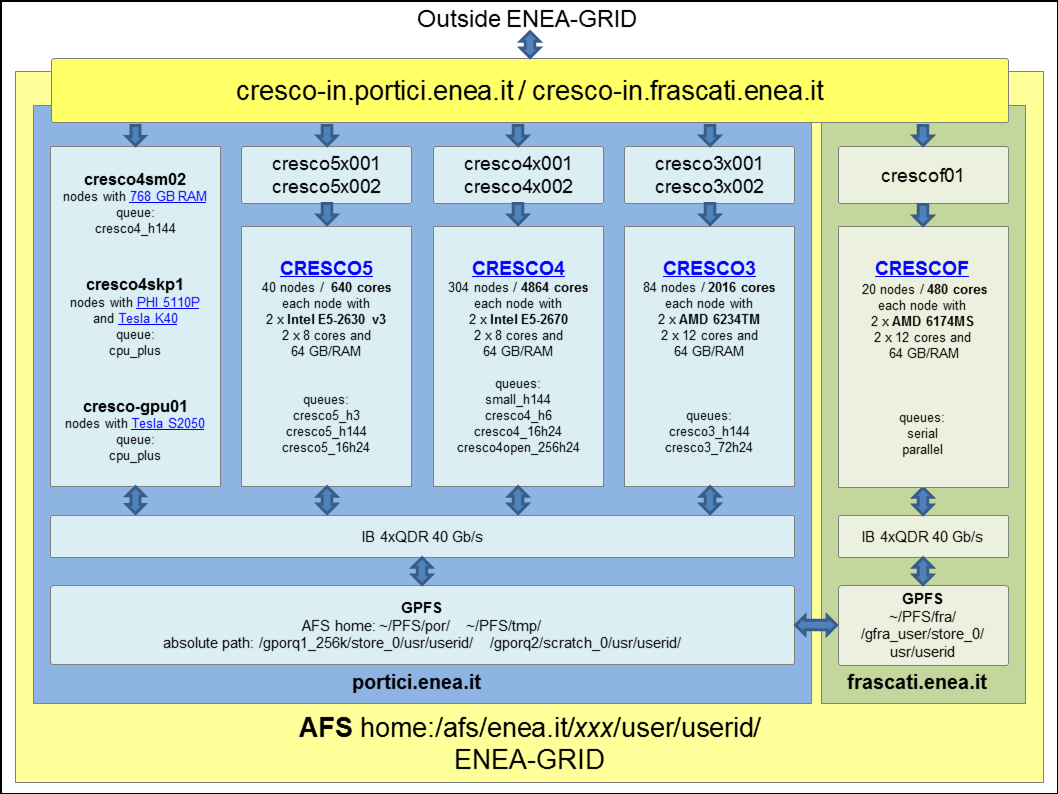
example for submission on CRESCO3: cresco3x001, cresco3x002
bsub -n 240 -q cresco3_72h24 -o file.out -e err.dat cpmdxxx_par file.in
bsub -n 48 -q cresco3_h144 -o file.out -e err.dat cpmdxxx_par file.in
bsub -n 1 -q cresco3_h144 -o file.out -e err.dat cpmdxxx_ser file.in
example for submission on CRESCO4: cresco4x001, cresco4x002
bsub -n 400 -q cresco4_256h24 -o file.out -e err.dat cpmdxxx_par file.in
bsub -n 64 -q cresco4_16h24 -o file.out -e err.dat cpmdxxx_par file.in
bsub -n 64 -q cresco4_h6 -o file.out -e err.dat cpmdxxx_par file.in
bsub -n 1 -q cresco4_h6 -o file.out -e err.dat cpmdxxx_ser file.in
example for submission on CRESCOF: crescof01
bsub -n 240 -q parallel -o file.out -e err.dat cpmdxxx_par file.in
bsub -n 1 -q serial -o file.out -e err.dat cpmdxxx_ser file.in
N.B.
-R "span[ptile=24]", -R "same[model]", -R K40, -R S2050,
-R "select[model==intel_E5530]", -R "select[model==intel_E5620]",
-R "select[hname==crescoxx1 || hname==crescoxx2]", -R "select[hname!=crescoxx3]"
Discipline: Computational Materials Science
The CPMD code is a parallelized plane wave/pseudopotential implementation of Density Functional Theory, particularly designed for ab-initio molecular dynamics. Some features are: works with norm conserving or ultrasoft pseudopotentials, LDA, LSD and the most popular gradient correction schemes; free energy density functional implementation, isolated systems and system with periodic boundary conditions; k-points, molecular and crystal symmetry, wavefunction optimization: direct minimization and diagonalization, geometry optimization: local optimization and simulated annealing, molecular dynamics: constant energy, constant temperature and constant pressure, path integral MD, response functions, excited states, many electronic properties, time-dependent DFT (excitations, molecular dynamics in excited states), coarse-grained non-Markovian metadynamics.
In this page you can find the launching and submission syntax for CPMD code on the ENEA-GRID. Please, read the following documentation for running serial/parallel application on CRESCO clusters using LSF framework: Batch Jobs / LSF. This is not a tutorial about using codes like CPMD, for that, you may find documentation and tutorial on the official web site www.cpmd.org.
The CPMD code is a parallelized plane wave/pseudopotential implementation of Density Functional Theory, particularly designed for ab-initio molecular dynamics. CPMD ver.3.15.3, ver.3.17.1 and ver.4.1.0 are available for use on ENEA-GRID for legitimate CPMD license holders. Request for access to CPMD must go directly to cmast lab contacts. You will need to provide evidence of a CPMD license such as the original registration e-mail. A license must be obtained from http://cpmd.org/download/cpmd-licence.
| CRESCO Cluster |
CRESCO2 front-end cresco2x001 cresco2x002 |
CRESCO3 front-end cresco3x001 cresco3x002 |
CRESCO4 front-end cresco4x001 cresco4x002 |
CRESCOF front-end crescof01 |
||
| LSF submission | bsub -n N -q queue bsub_options -o file.out -e file.err cpmdxxx_par file.in bsub -n 1 -q queue bsub_options -o file.out -e file.err cpmdxxx_ser file.in |
|||||
- To use CPMD ver.4.1.0 replace cpmdxxx_par and cpmdxxx_ser with cpmd4.1.0_par and cpmd4.1.0_ser respectively.
- To use CPMD ver.3.17.1 replace cpmdxxx_par and cpmdxxx_ser with cpmd3.17.1_par and cpmd3.17.1_ser respectively.
- To use CPMD ver.3.15.3 replace cpmdxxx_par and cpmdxxx_ser with cpmd3.15.3_par and cpmd3.15.3_ser respectively.
N.B. In this cluster the version 4.1.0 is NOT available.
bsub -n 256 -q cresco_32h24 -o file.out -e err.dat cpmdxxx_par file.in
bsub -n 16 -q cresco_h144 -R model==intel_E5620 -o file.out -e err.dat cpmdxxx_par file.in
bsub -n 1 -q cresco_h144 -R model==intel_E5620 -o file.out -e err.dat cpmdxxx_ser file.in
example for submission on CRESCO3: cresco3x001, cresco3x002
bsub -n 240 -q cresco3_72h24 -o file.out -e err.dat cpmdxxx_par file.in
bsub -n 48 -q cresco3_h144 -o file.out -e err.dat cpmdxxx_par file.in
bsub -n 1 -q cresco3_h144 -o file.out -e err.dat cpmdxxx_ser file.in
example for submission on CRESCO4: cresco4x001, cresco4x002
bsub -n 400 -q cresco4_256h24 -o file.out -e err.dat cpmdxxx_par file.in
bsub -n 64 -q cresco4_16h24 -o file.out -e err.dat cpmdxxx_par file.in
bsub -n 64 -q cresco4_h6 -o file.out -e err.dat cpmdxxx_par file.in
bsub -n 1 -q cresco4_h6 -o file.out -e err.dat cpmdxxx_ser file.in
example for submission on CRESCOF: crescof01
bsub -n 240 -q parallel -o file.out -e err.dat cpmdxxx_par file.in
bsub -n 1 -q serial -o file.out -e err.dat cpmdxxx_ser file.in
N.B.
- It is not necessary to set the MPI enviroment;
- From each cresco cluster it is possible to use RESTART files generated by the other cresco clusters;
- For the interactive submission on the front-ends cresco2x002, cresco3x002 and cresco4x002 use the command:
- cpmdxxx_ser file.in > file.out
- Pseudopotentials: different types of pseudopotentials are in the directory
/afs/enea.it/software/cpmd/pseudo/ (link) - external link
- The CPMD test suite, with input and reference outputs, is in the directory /afs/enea.it/software/cpmd/CPMD-test/ (link)
- The cpmd2cube, trimcube and cutcube utilities for cubefile are available on the CRESCO front-ends. The commands are:
- cpmd2cube;
- cpmdtrimcube;
- cpmdcutcube.
-R "span[ptile=24]", -R "same[model]", -R K40, -R S2050,
-R "select[model==intel_E5530]", -R "select[model==intel_E5620]",
-R "select[hname==crescoxx1 || hname==crescoxx2]", -R "select[hname!=crescoxx3]"