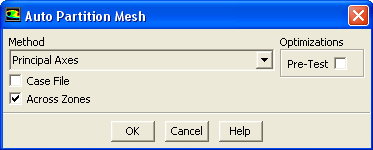
The
Parallel/Auto Partition... menu item opens the
Auto Partition Mesh dialog box.
Auto Partition Mesh Dialog Box
The
Auto Partition Mesh dialog box allows you to set the parameters for automatic partitioning when reading an unpartitioned mesh into the parallel solver. See Section
32.5.3 for details.
Controls
Method
contains a drop-down list of the recursive partition methods that can be used to create the mesh partitions. The choices include the
Cartesian Axes,
Cartesian Strip,
Cartesian X-Coordinate,
Cartesian Y-Coordinate,
Cartesian Z-Coordinate,
Cartesian R Axes,
Cartesian RX-Coordinate,
Cartesian RY-Coordinate,
Cartesian RZ-Coordinate,
Cylindrical Axes,
Cylindrical R-Coordinate,
Cylindrical Theta-Coordinate,
Cylindrical Z-Coordinate,
Metis,
Polar Axes,
Polar R-Coordinate,
Polar Theta-Coordinate,
Principal Axes,
Principal Strip,
Principal X-Coordinate,
Principal Y-Coordinate,
Principal Z-Coordinate,
Spherical Axes,
Spherical Rho-Coordinate,
Spherical Theta-Coordinate, and
Spherical Phi-Coordinate techniques, which are described in Section
32.5.6.
Case File
allows you to use a valid existing partition section in a case file (i.e., one where the number of partitions in the case file divides evenly into the number of compute nodes). You need to turn off the
Case File option only if you want to change other parameters in the
Auto Partition Mesh dialog box.
Across Zones
allows partitions to cross zone boundaries (the default). If turned off, it will restrict partitioning to within each cell zone. This is recommended
only when cells in different zones require significantly different amounts of computation during the solution phase, for example if the domain contains both solid and fluid zones.
Optimizations
contains a toggle button to activate pre-testing.
Pre-Test
instructs the solver to test all coordinate directions and choose the one which yields the fewest partition interfaces for the final bisection. Note that this option is available only when you choose
Principal Axes or
Cartesian Axes as the partitioning method.
![[ANSYS, Inc. Logo]](fluentlogo.gif)