[ANSYS, Inc. Logo] return to home search
next up previous contents index


33.7.17 Symmetry Dialog Box

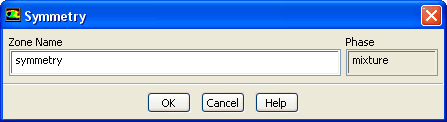
The Symmetry dialog box can be used to modify the name of a symmetry zone; there are no conditions to be set. It is opened from the Boundary Conditions task page. See Section  7.3.15 for information about symmetry boundaries.
figure

Controls

Zone Name   sets the name of the zone.

Phase   displays the name of the phase. This item is available only for multiphase flows.


next up previous contents index Previous: 33.7.16 Radiator Dialog Box
Up: 33.7 Boundary Conditions Task
Next: 33.7.18 Velocity Inlet Dialog
Release 12.0 © ANSYS, Inc. 2009-01-29