The
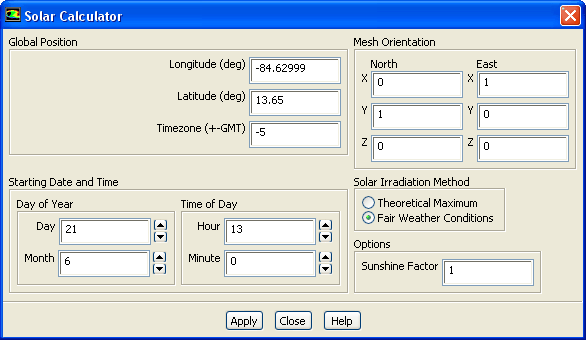
Solar Calculator dialog box allows you to set parameters related to the calculation of solar load models. See Section
13.3.9 for details. This dialog box opens when you click on the
Solar Calculator... button in the
Radiation Model dialog box.
Controls
Global Position
contains the parameters to define the position of solar radiation.
Longitude
specifies the longitude of the desired location in degrees. Values may range from
to
, where negative values indicate the Western hemisphere and positive values indicate the Eastern hemisphere.
Latitude
specifies the latitude of the desired location in degrees. Values may range from
(South pole) to
(North pole) with
defined as the equator.
Timezone
specifies the local time zone of the desired location in hours relative to Greenwich Mean Time (+-GMT). This integer value can range from
to
.
Starting Date and Time
contains parameters to specify date and time.
Day of Year
contains parameters to specify day and month.
Time of Day
contains parameters to specify hour and minutes.
Mesh Orientation
specifies the orientation as the vectors for North and East in the CFD grid system of coordinates.
Solar Irradiation Method
contains parameters to choose the solar irradiation method.
Theoretical Maximum
enables theoretically maximum solar irradiation method.
Fair Weather Conditions
enables fair weather condition solar irradiation method.
Sunshine Factor
is a linear reduction factor for the computed incident load that allows for cloud cover to be accounted for, if appropriate.
![[ANSYS, Inc. Logo]](fluentlogo.gif)


 to
to
 , where negative values indicate the Western hemisphere and positive values indicate the Eastern hemisphere.
 (South pole) to
 (North pole) with
 defined as the equator.
 to
to
 .
.