Step 5: Cell Zone Conditions
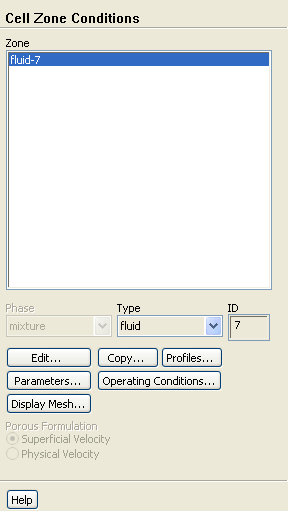
Cell Zone Conditions
Set up the present problem using a rotating reference frame
for the fluid. Then define the disk walls to rotate with the moving frame.
1. Define the rotating reference frame for the fluid zone (
fluid-7
).
Cell Zone Conditions
fluid-7
Edit...
(a) Select
Moving Reference Frame
from the
Motion Type
drop-down list.
(b) Enter
71.08
rpm for
Speed
in the
Rotational Velocity
group box.
(c) Click
OK
to close the
Fluid
dialog box.
Previous:
Step 4: Materials
Up:
Using a Single Rotating
Next:
Step 6: Boundary Conditions
Release 12.0 ©
ANSYS, Inc.
2009-02-09
![[ANSYS, Inc. Logo]](fluentlogo.gif)


 Cell Zone Conditions
 Cell Zone Conditions

 fluid-7
 Edit...
 Previous:
Step 4: Materials
Previous:
Step 4: Materials